> ## Documentation Index
> Fetch the complete documentation index at: https://docs-dev-chore-events-autoupdate.mintlify.site/llms.txt
> Use this file to discover all available pages before exploring further.

> Describes how to unlink devices assigned to a user using the Auth0 Dashboard.

# Unlink Devices from Users

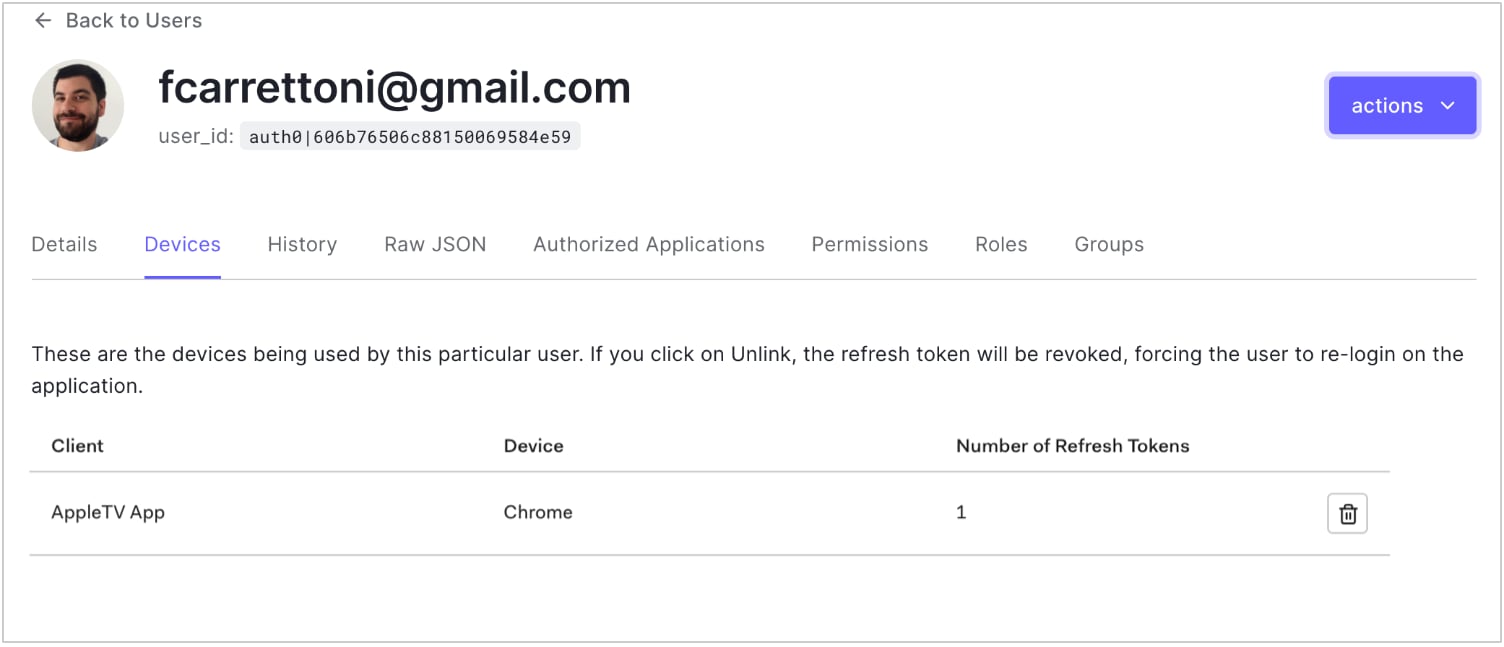
You can unlink the devices assigned to a user using the <Tooltip tip="Auth0 Dashboard: Auth0's main product to configure your services." cta="View Glossary" href="/docs/glossary?term=Auth0+Dashboard">Auth0 Dashboard</Tooltip>. This revokes the <Tooltip tip="Auth0 Dashboard: Auth0's main product to configure your services." cta="View Glossary" href="/docs/glossary?term=refresh+token">refresh token</Tooltip> for the selected device.

1. Go to [Dashboard > User Management > Users](https://manage.auth0.com/#/users) and click the name of the user.
2. Click the **Devices** view, then click the trashcan icon next to the device you want to unlink, and confirm.
   <Frame>
     <img src="https://mintcdn.com/docs-dev-chore-events-autoupdate/yZguHZo4mYCarnn9/docs/images/cdy7uua7fh8z/SvkfrGgmpTBLisUq0tViL/ba091efbcc897870d59810b84c753682/Screen_Shot_2021-05-18_at_9.59.16_PM.png?fit=max&auto=format&n=yZguHZo4mYCarnn9&q=85&s=146fb507347bdd9832e4fba133115d12" alt="Dashboard - Users & Roles - Users - Devices View" width="1504" height="647" data-path="docs/images/cdy7uua7fh8z/SvkfrGgmpTBLisUq0tViL/ba091efbcc897870d59810b84c753682/Screen_Shot_2021-05-18_at_9.59.16_PM.png" />
   </Frame>
