> ## Documentation Index
> Fetch the complete documentation index at: https://docs-dev-chore-events-autoupdate.mintlify.site/llms.txt
> Use this file to discover all available pages before exploring further.

> Forms を使用してレンダリングできる利用可能なノードと入力フィールドコンポーネントについて説明します。

# ノードとコンポーネント

Forms では、フィールド、ブロック、ウィジェットなど、ユーザーがフォームを操作するためのノードやコンポーネントを追加できます。さらに、コンポーネントに入力されたデータは、フォームやフロー内で参照できます。

<h2 id="form-nodes">
  フォームノード
</h2>

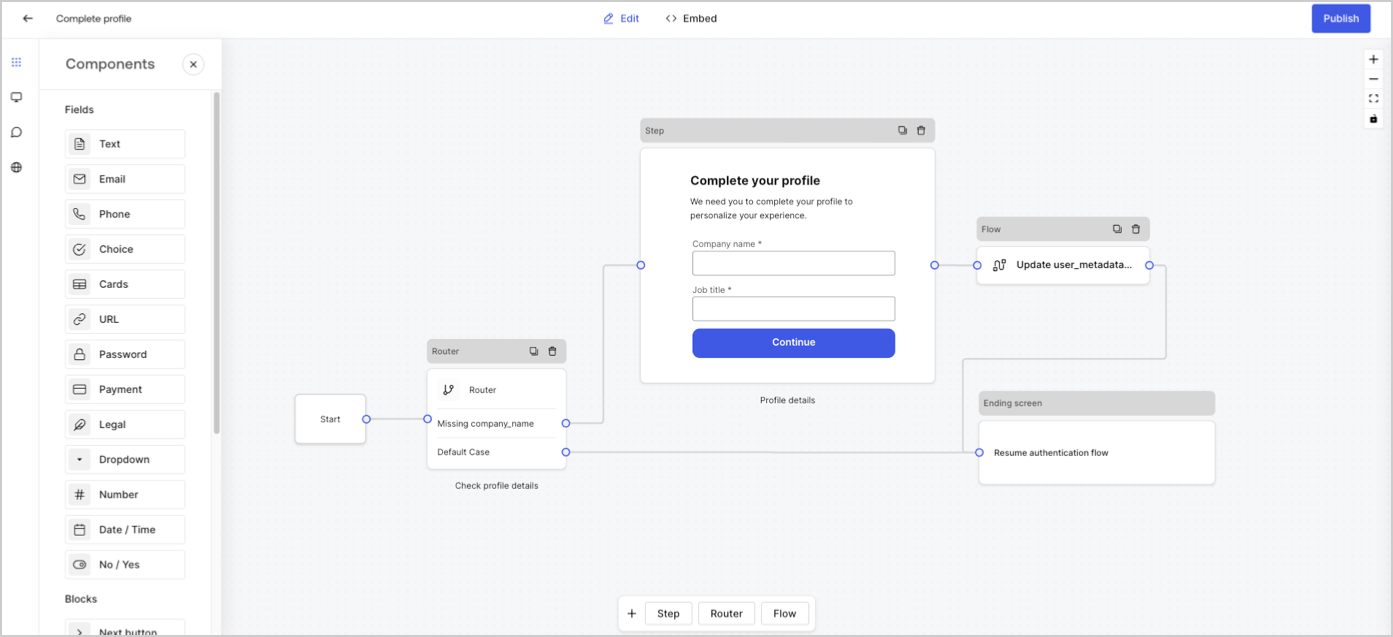
フォームノードには、Start、Step、Flow、Router、Ending screen の5種類があります。これらのノードは、フォームの構造においてそれぞれ特定の役割を担っています。
<Frame>
  <img src="https://mintcdn.com/docs-dev-chore-events-autoupdate/bbEbROOHwGAWmGEh/docs/images/cdy7uua7fh8z/5V4GsHxxC2cjxx1aODCxPd/309850c72bbce224e7a8d3f5af34114c/form-editor-preview.png?fit=max&auto=format&n=bbEbROOHwGAWmGEh&q=85&s=95834658db60292c223d1c74ece85aeb" alt="Dashboard >  Forms > Form Editor" data-og-width="1393" width="1393" data-og-height="637" height="637" data-path="docs/images/cdy7uua7fh8z/5V4GsHxxC2cjxx1aODCxPd/309850c72bbce224e7a8d3f5af34114c/form-editor-preview.png" data-optimize="true" data-opv="3" srcset="https://mintcdn.com/docs-dev-chore-events-autoupdate/bbEbROOHwGAWmGEh/docs/images/cdy7uua7fh8z/5V4GsHxxC2cjxx1aODCxPd/309850c72bbce224e7a8d3f5af34114c/form-editor-preview.png?w=280&fit=max&auto=format&n=bbEbROOHwGAWmGEh&q=85&s=4b96b6041a1d9bbc93f98fa36048e227 280w, https://mintcdn.com/docs-dev-chore-events-autoupdate/bbEbROOHwGAWmGEh/docs/images/cdy7uua7fh8z/5V4GsHxxC2cjxx1aODCxPd/309850c72bbce224e7a8d3f5af34114c/form-editor-preview.png?w=560&fit=max&auto=format&n=bbEbROOHwGAWmGEh&q=85&s=2075424d187f7e45c43b982ecf0ac6f7 560w, https://mintcdn.com/docs-dev-chore-events-autoupdate/bbEbROOHwGAWmGEh/docs/images/cdy7uua7fh8z/5V4GsHxxC2cjxx1aODCxPd/309850c72bbce224e7a8d3f5af34114c/form-editor-preview.png?w=840&fit=max&auto=format&n=bbEbROOHwGAWmGEh&q=85&s=e33449503ca6a10e95b26323f03229a3 840w, https://mintcdn.com/docs-dev-chore-events-autoupdate/bbEbROOHwGAWmGEh/docs/images/cdy7uua7fh8z/5V4GsHxxC2cjxx1aODCxPd/309850c72bbce224e7a8d3f5af34114c/form-editor-preview.png?w=1100&fit=max&auto=format&n=bbEbROOHwGAWmGEh&q=85&s=54c6324103f464da6d916b0df48d0848 1100w, https://mintcdn.com/docs-dev-chore-events-autoupdate/bbEbROOHwGAWmGEh/docs/images/cdy7uua7fh8z/5V4GsHxxC2cjxx1aODCxPd/309850c72bbce224e7a8d3f5af34114c/form-editor-preview.png?w=1650&fit=max&auto=format&n=bbEbROOHwGAWmGEh&q=85&s=6c7253725932a0803445e7f194a62ee2 1650w, https://mintcdn.com/docs-dev-chore-events-autoupdate/bbEbROOHwGAWmGEh/docs/images/cdy7uua7fh8z/5V4GsHxxC2cjxx1aODCxPd/309850c72bbce224e7a8d3f5af34114c/form-editor-preview.png?w=2500&fit=max&auto=format&n=bbEbROOHwGAWmGEh&q=85&s=7f681c93ad48e960104d0fa50c03636f 2500w" />
</Frame>

<h2 id="step-node">
  ステップノード
</h2>

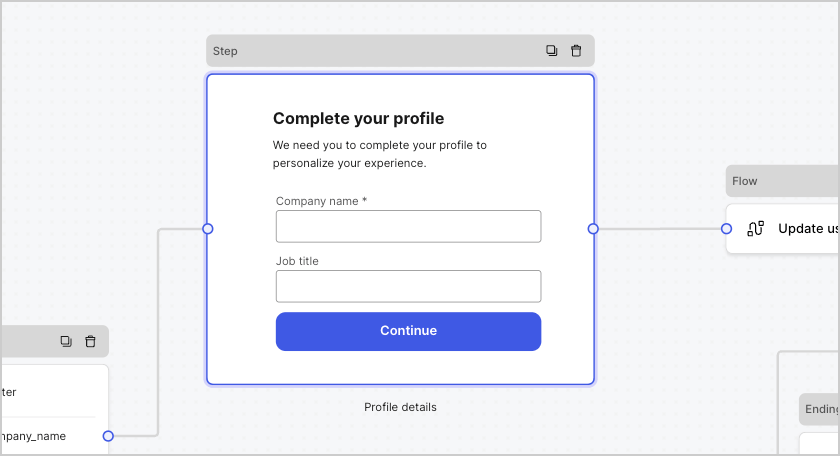
ステップノードは、フォームを視覚的に表したものです。ユーザーがデータを入力できるフィールド、ブロック、ウィジェットなど、任意の数のコンポーネントを含めることができます。
<Frame>
  <img src="https://mintcdn.com/docs-dev-chore-events-autoupdate/C-wLBWI5GtiUYTuO/docs/images/cdy7uua7fh8z/2tbkcXkVon0BawCvYgnvIz/e2ce566320af18a6b08702f04f763126/form-step-node.png?fit=max&auto=format&n=C-wLBWI5GtiUYTuO&q=85&s=c29b8de7f11c75b171cb8419e0395d73" alt="Dashboard > Foms > ステップノード" data-og-width="840" width="840" data-og-height="456" height="456" data-path="docs/images/cdy7uua7fh8z/2tbkcXkVon0BawCvYgnvIz/e2ce566320af18a6b08702f04f763126/form-step-node.png" data-optimize="true" data-opv="3" srcset="https://mintcdn.com/docs-dev-chore-events-autoupdate/C-wLBWI5GtiUYTuO/docs/images/cdy7uua7fh8z/2tbkcXkVon0BawCvYgnvIz/e2ce566320af18a6b08702f04f763126/form-step-node.png?w=280&fit=max&auto=format&n=C-wLBWI5GtiUYTuO&q=85&s=ee10fe57dd3209aa547c70a1bce4415b 280w, https://mintcdn.com/docs-dev-chore-events-autoupdate/C-wLBWI5GtiUYTuO/docs/images/cdy7uua7fh8z/2tbkcXkVon0BawCvYgnvIz/e2ce566320af18a6b08702f04f763126/form-step-node.png?w=560&fit=max&auto=format&n=C-wLBWI5GtiUYTuO&q=85&s=64cded075e0574215981414e00f9d234 560w, https://mintcdn.com/docs-dev-chore-events-autoupdate/C-wLBWI5GtiUYTuO/docs/images/cdy7uua7fh8z/2tbkcXkVon0BawCvYgnvIz/e2ce566320af18a6b08702f04f763126/form-step-node.png?w=840&fit=max&auto=format&n=C-wLBWI5GtiUYTuO&q=85&s=1f3f5e4ba01dfb5b6b1ef0e1687f9000 840w, https://mintcdn.com/docs-dev-chore-events-autoupdate/C-wLBWI5GtiUYTuO/docs/images/cdy7uua7fh8z/2tbkcXkVon0BawCvYgnvIz/e2ce566320af18a6b08702f04f763126/form-step-node.png?w=1100&fit=max&auto=format&n=C-wLBWI5GtiUYTuO&q=85&s=35993628bfb72a1abadb9f80f126d8d7 1100w, https://mintcdn.com/docs-dev-chore-events-autoupdate/C-wLBWI5GtiUYTuO/docs/images/cdy7uua7fh8z/2tbkcXkVon0BawCvYgnvIz/e2ce566320af18a6b08702f04f763126/form-step-node.png?w=1650&fit=max&auto=format&n=C-wLBWI5GtiUYTuO&q=85&s=b31b7166819dfcc525bcb4739a041dae 1650w, https://mintcdn.com/docs-dev-chore-events-autoupdate/C-wLBWI5GtiUYTuO/docs/images/cdy7uua7fh8z/2tbkcXkVon0BawCvYgnvIz/e2ce566320af18a6b08702f04f763126/form-step-node.png?w=2500&fit=max&auto=format&n=C-wLBWI5GtiUYTuO&q=85&s=4b59feb9de99568df840fac118193ebd 2500w" />
</Frame>

<h3 id="field-components">
  フィールドコンポーネント
</h3>

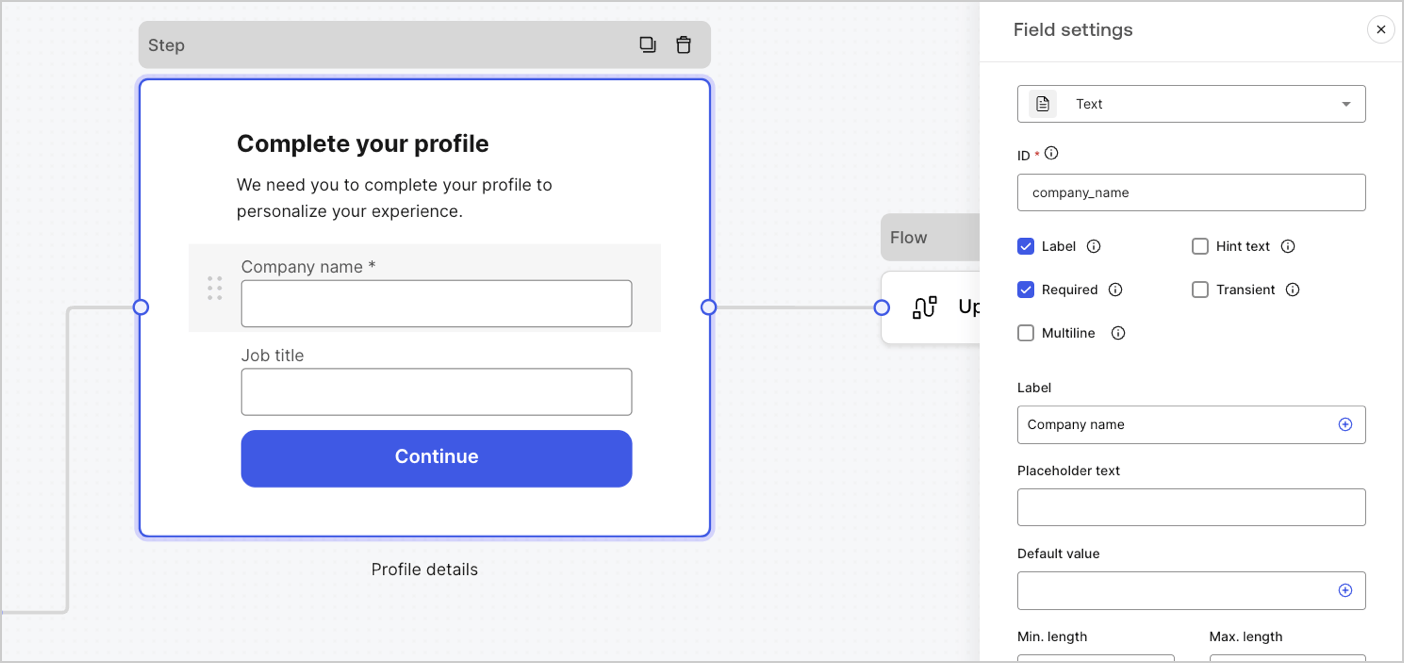
フィールドは、Forms でユーザーが情報を入力するための UI コンポーネントです。
<Frame>
  <img src="https://mintcdn.com/docs-dev-chore-events-autoupdate/JrqAYUIkepsXuxEr/docs/images/cdy7uua7fh8z/6fuBdJcbDybzcVaiByUkoQ/2ad29c8dbbcc6ddf850f5efc004a75e0/forms-fields.png?fit=max&auto=format&n=JrqAYUIkepsXuxEr&q=85&s=ceca519726ba79e7943525bde7d8f2df" alt="Dashboard > Forms > Fields" data-og-width="1404" width="1404" data-og-height="663" height="663" data-path="docs/images/cdy7uua7fh8z/6fuBdJcbDybzcVaiByUkoQ/2ad29c8dbbcc6ddf850f5efc004a75e0/forms-fields.png" data-optimize="true" data-opv="3" srcset="https://mintcdn.com/docs-dev-chore-events-autoupdate/JrqAYUIkepsXuxEr/docs/images/cdy7uua7fh8z/6fuBdJcbDybzcVaiByUkoQ/2ad29c8dbbcc6ddf850f5efc004a75e0/forms-fields.png?w=280&fit=max&auto=format&n=JrqAYUIkepsXuxEr&q=85&s=23f6ae1c629ab642b0d2ae134c095ffb 280w, https://mintcdn.com/docs-dev-chore-events-autoupdate/JrqAYUIkepsXuxEr/docs/images/cdy7uua7fh8z/6fuBdJcbDybzcVaiByUkoQ/2ad29c8dbbcc6ddf850f5efc004a75e0/forms-fields.png?w=560&fit=max&auto=format&n=JrqAYUIkepsXuxEr&q=85&s=deed8ee875a578f502a822c909e1fa88 560w, https://mintcdn.com/docs-dev-chore-events-autoupdate/JrqAYUIkepsXuxEr/docs/images/cdy7uua7fh8z/6fuBdJcbDybzcVaiByUkoQ/2ad29c8dbbcc6ddf850f5efc004a75e0/forms-fields.png?w=840&fit=max&auto=format&n=JrqAYUIkepsXuxEr&q=85&s=fafb0cf4f0977003a44f00279d3c11dd 840w, https://mintcdn.com/docs-dev-chore-events-autoupdate/JrqAYUIkepsXuxEr/docs/images/cdy7uua7fh8z/6fuBdJcbDybzcVaiByUkoQ/2ad29c8dbbcc6ddf850f5efc004a75e0/forms-fields.png?w=1100&fit=max&auto=format&n=JrqAYUIkepsXuxEr&q=85&s=901c12b5c2f4b2d2a8252e48eeaa5f4c 1100w, https://mintcdn.com/docs-dev-chore-events-autoupdate/JrqAYUIkepsXuxEr/docs/images/cdy7uua7fh8z/6fuBdJcbDybzcVaiByUkoQ/2ad29c8dbbcc6ddf850f5efc004a75e0/forms-fields.png?w=1650&fit=max&auto=format&n=JrqAYUIkepsXuxEr&q=85&s=538977c87e6504bf6cce81fe38cd8690 1650w, https://mintcdn.com/docs-dev-chore-events-autoupdate/JrqAYUIkepsXuxEr/docs/images/cdy7uua7fh8z/6fuBdJcbDybzcVaiByUkoQ/2ad29c8dbbcc6ddf850f5efc004a75e0/forms-fields.png?w=2500&fit=max&auto=format&n=JrqAYUIkepsXuxEr&q=85&s=d06817948a319b0e355b6e99f974914d 2500w" />
</Frame>

<h4 id="field-settings">
  フィールド設定
</h4>

フィールドには、要件に合わせて設定できる既定の項目がいくつかあります。

既定のフィールド設定は次のとおりです。

| 設定 | 説明 |
| - | - |
| ID | 一意の ID |
| ラベル | ラベルの表示/非表示 |
| 必須 | 入力値が必須 |
| ヒントテキスト | ヒントテキストを表示 |
| プレースホルダーテキスト | ユーザーに表示されるテキスト |
| デフォルト値 | ユーザーに表示されるデフォルト値 |
| 一時的 | データマスクの有効/無効 |

<h4 id="field-validation-rules">
  フィールドの検証ルール
</h4>

| 設定 | 説明 |
| - | - |
| 最小長 / 最大長 | 入力値の長さを制限します。 |
| 最小値 / 最大値 | 数値の範囲を制限します。 |

<h4 id="available-fields-in-forms">
  Formsで利用できるフィールド
</h4>

利用可能なフィールドと、それぞれの固有の設定およびデータ出力型は次のとおりです。

<AccordionGroup>
  <Accordion title="テキストフィールド">
    標準入力では、ユーザーは任意の文字列を入力できます。

    <h5 id="text-field-settings">
      テキストフィールドの設定
    </h5>

    テキストフィールドの設定は次のとおりです。

    | 設定 | 説明 |
    | - | - |
    | 複数行 | 複数行のテキスト入力を有効にします。 |

    <h5 id="text-field-output-value">
      テキストフィールドの出力値
    </h5>

    テキストフィールドの出力値のデータ型は `string` です。

    ```json lines theme={null}
    {
      "text_field_id": "Auth0"
    }
    ```
  </Accordion>

  <Accordion title="メールアドレス欄">
    標準入力では、ユーザーがメールアドレスを文字列として入力できます。

    <h5 id="email-field-output-value">
      メールフィールドの出力値
    </h5>

    メールフィールドの出力値のデータ型は`string`です。

    ```json lines theme={null}
    {
      "email_field_id": "username@domain.com"
    }
    ```
  </Accordion>

  <Accordion title="電話番号フィールド">
    標準入力では、ユーザーは電話番号を入力できます。

    <h5 id="phone-field-settings">
      電話フィールドの設定
    </h5>

    電話フィールドの設定は次のとおりです。

    | Settings | Description |
    | - | - |
    | 国選択 | 国選択の有効 / 無効を切り替えます。既定では、ユーザーの IP アドレスに基づく所在地が表示されます。 |
    | フィルタのプレースホルダーテキスト | 国検索ウィンドウでユーザーに表示されるテキスト。 |

    <h5 id="phone-field-output-value">
      電話フィールドの出力値
    </h5>

    電話フィールドの出力値のデータ型は、`string`、または国選択が有効な場合は `object` です。

    電話フィールドの出力データ型の値が `string` の場合:

    ```json lines theme={null}
    {
      "phone_field_id": "8005550175"
    }
    ```

    電話フィールドの出力データ型の値は、`object`です:

    ```json lines theme={null}
    {
      "phone_field_id": {
        "national_number": "8005550175",
        "national_format": "(800) 555-0175",
        "international_number": "+18005550175",
        "international_format": "+1 800-555-0175",
        "country_code_iso": "US",
        "country_code_number": "1"
      }
    }
    ```
  </Accordion>

  <Accordion title="選択肢フィールド">
    ユーザーが単一または複数の選択肢から値を選択できる標準入力です。

    <h5 id="choice-field-settings">
      Choice フィールドの設定
    </h5>

    Choice フィールドの設定は次のとおりです。

    | Settings | Description |
    | - | - |
    | 複数選択 | 複数の選択肢を有効にします。 |
    | その他 | ユーザーが独自の選択肢を入力できるようにします。 |
    | Advanced > Internal values | 各選択肢に内部値を割り当てます。 |
    | Advanced > Bulk edit | ラベルと各選択肢の内部値を一括編集します。 |

    <h5 id="choice-field-output-value">
      Choice フィールドの出力値
    </h5>

    Choice フィールドの出力値のデータ型は、`string`、または複数選択が有効な場合は `array of strings` です。

    `string` としての Choice フィールド出力値:

    ```json lines theme={null}
    {
      "choice_field_id": "Option A"
    }
    ```

    選択フィールドの出力データ型の値は `array of strings` です:

    ```json lines theme={null}
    {
      "choice_field_id": ["Option A", "Option B"]
    }
    ```
  </Accordion>

  <Accordion title="カードフィールド">
    ユーザーが画像の選択肢を単一または複数選択できる標準入力です。

    <h5 id="cards-field-settings">
      カードフィールドの設定
    </h5>

    カードフィールドの設定は次のとおりです。

    | 設定 | 説明 |
    | - | - |
    | 複数選択 | 複数の選択肢を有効にします。 |
    | ラベルを非表示 | カードのラベルを非表示にします。 |
    | Advanced > Internal values | 各選択肢に内部値を割り当てます。 |

    <h5 id="cards-field-output-value">
      カードフィールドの出力値
    </h5>

    カードフィールドの出力値のデータ型は、`string`、または複数選択が有効な場合は `array of strings` になります。

    `string` としてのカードフィールドの出力データ型の値:

    ```json lines theme={null}
    {
      "card_field_id": "Option A"
    }
    ```

    cards フィールドは、データ型の値を`array of strings`として出力します。

    ```json lines theme={null}
    {
      "card_field_id": ["Option A", "Option B"]
    }
    ```
  </Accordion>

  <Accordion title="URL フィールド">
    標準入力では、ユーザーはURLを入力できます。

    <h5 id="url-field-output-value">
      URL フィールドの出力値
    </h5>

    URL フィールドの出力値のデータ型は文字列です:

    ```json lines theme={null}
    {
      "url_field_id": "https://auth0.com"
    }
    ```
  </Accordion>

  <Accordion title="パスワード欄">
    ユーザーがパスワードや秘密の値を入力できる標準的な入力欄です。

    <h5 id="password-field-settings">
      パスワードフィールドの設定
    </h5>

    パスワードフィールドの設定は次のとおりです。

    | Settings | Description |
    | - | - |
    | 複雑なパスワードを必須にする | パスワードには、大文字、小文字、記号、数字を含める必要があります。 |
    | NIST ガイドラインを適用する | パスワードは 8 文字未満にはできません。また、過去の漏えいデータに含まれるパスワード、辞書語、同じ文字の繰り返しや連続する文字列、内容に関連する語句は使用できません。 |
    | 強度メーターを追加する | パスワード入力の強度を示すため、赤・黄・緑のスケールを持つグラフィカルなメーターがパスワードフィールドの下に表示されます。 |
    | ハッシュ化 | 入力値をブラウザー内で直接ハッシュ化するためのアルゴリズムを選択します。 |

    <h5 id="password-field-output-value">
      パスワードフィールドの出力値
    </h5>

    パスワードフィールドの出力値のデータ型は、マスクされた `string` です。

    ```json lines theme={null}
    {
      "password_field_id": "███"
    }
    ```
  </Accordion>

  <Accordion title="支払いフィールド">
    決済プロバイダーを使用して、ユーザーが支払い情報を入力できる標準入力フィールドです。支払いは Ending ノードに到達する前に処理されます。

    <h5 id="payment-field-settings">
      支払いフィールドの設定
    </h5>

    支払いフィールドの設定は次のとおりです。

    | Settings | Description |
    | - | - |
    | Payment type | 1 回限りの支払い (Charge) または継続課金 (Subscription) のいずれかを選択します。 |
    | Amount | 1 回限りの支払い (Charge) の金額を指定します。 |
    | Currency | 1 回限りの支払い (Charge) の通貨を指定します。 |
    | Subscription action | 既存のサブスクリプションを新規作成するか、更新するかを選択します。 |
    | Customer action | 顧客を新規作成するか、既存の顧客を更新するかを選択します。 |
    | Display options | カード番号、有効期限、セキュリティコードのラベルとトラストマークの表示・編集を行います。 |

    <h5 id="payment-field-output-value">
      支払いフィールドの出力値
    </h5>

    支払いフィールドの出力値のデータ型は、送信後フローでは `string` または `object` です。

    `string` としての支払いフィールドの出力値のデータ型:

    ```json lines theme={null}
    {
      "payment_field_id": "pm_1P19e..."
    }
    ```

    サブスクリプションの支払いフィールドの出力値のデータ型は `object` です：

    ```json lines theme={null}
    {
      "payment_field_id": {
        "payment_method_id": "pm_1P19e...",
        "customer_id": "cus_PqrM...",
        "price_ids": [
          "price_1ONHR..."
        ],
        "subscription_id": "sub_1P1A...",
        "payment_intent_id": "pi_3P19e5..."
      }
    }
    ```

    charge の支払いフィールドの出力値のデータ型は `object` です:

    ```json lines theme={null}
    {
      "payment_field_id": {
        "payment_method_id": "pm_1P19e...",
        "customer_id": "cus_PqrM...",
        "amount": 100,
        "payment_intent_id": "pi_3P19e5..."
      }
    }
    ```
  </Accordion>

  <Accordion title="法的事項フィールド">
    法的な文言とチェック入力を追加する標準フィールド。

    <h5 id="legal-field-output-value">
      Legal フィールドの出力値
    </h5>

    Legal フィールドの出力値のデータ型は `boolean` です。

    ```json lines theme={null}
    {
      "legal_field_id": true
    }
    ```
  </Accordion>

  <Accordion title="ドロップダウンフィールド">
    ユーザーがドロップダウンから単一または複数の選択肢を選べる標準入力です。

    <h5 id="dropdown-field-settings">
      ドロップダウンフィールドの設定
    </h5>

    ドロップダウンフィールドの設定は次のとおりです。

    | Settings | Description |
    | - | - |
    | 複数選択 | 複数の選択肢を有効にします。 |
    | Advanced > 内部値 | 各オプションに内部値を割り当てます。 |
    | Advanced > 一括編集 | ラベルと内部値を一括で編集します。 |

    <h5 id="dropdown-field-output-value">
      ドロップダウンフィールドの出力値
    </h5>

    ドロップダウンフィールドの出力値のデータ型は、`string`、または複数選択が有効になっている場合は`array of strings`です。

    `string`型のドロップダウンフィールド出力値:

    ```json lines theme={null}
    {
      "dropdown_field_id": "Option A"
    }
    ```

    ドロップダウンフィールドの出力データ型の値は `array of strings` です:

    ```json lines theme={null}
    {
      "dropdown_field_id": ["Option A", "Option B"]
    }
    ```
  </Accordion>

  <Accordion title="数値フィールド">
    ユーザーが数値を入力できる標準的な入力フィールドです。

    <h5 id="number-field-output-value">
      数値フィールドの出力値
    </h5>

    数値フィールドの出力値のデータ型は `number` です。

    ```json lines theme={null}
    {
      "number_field_id": 123
    }
    ```
  </Accordion>

  <Accordion title="日付 / 時刻フィールド">
    ユーザーが日付または時刻の値を入力できる標準入力フィールドです。

    <h5 id="date-time-field-settings">
      日付 / 時刻フィールドの設定
    </h5>

    日付 / 時刻フィールドの設定には、次の項目があります。

    | Key | Description |
    | - | - |
    | Format | 日付形式または時刻形式を選択します。 |

    <h5 id="date-time-field-output-value">
      日付 / 時刻フィールドの出力値
    </h5>

    日付 / 時刻フィールドで日付を選択した場合、出力データ型の値は `string` です。

    ```json lines theme={null}
    {
      "date_time_field_id": "2023-04-11"
    }
    ```

    日付/時刻フィールドの出力データ型では、時刻の値は `string` です。

    ```json lines theme={null}
    {
      "date_time_field_id": "23:15"
    }
    ```
  </Accordion>

  <Accordion title="真偽値フィールド">
    ユーザーが true または false の値を入力できる標準的な入力フィールドです。

    <h5 id="boolean-field-output-value">
      Boolean フィールドの出力値
    </h5>

    Boolean フィールドの出力値のデータ型は boolean です。

    ```json lines theme={null}
    {
      "boolean_field_id": true
    }
    ```
  </Accordion>

  <Accordion title="カスタムフィールド">
    独自のフィールドを作成できるようにカスタマイズ可能な標準フィールドです。

    <h5 id="custom-field-settings">
      カスタムフィールドの設定
    </h5>

    カスタムフィールドの設定は次のとおりです。

    | Settings | Description |
    | - | - |
    | Params | カスタムフィールドのソースコード内で参照するキーと値のペアを追加します。 |
    | Source code | カスタムフィールドに JavaScript コードを追加します。 |
    | JSON Schema | デフォルトでは、カスタムフィールドはあらゆる形式の値を受け付けます。ただし、JSON Schema を使用して値を検証できます。 |

    詳しくは、[フォームのカスタムフィールドコンポーネント](/docs/ja-jp/customize/forms/custom-field-components)をお読みください。
  </Accordion>
</AccordionGroup>

<h3 id="blocks-components">
  ブロックコンポーネント
</h3>

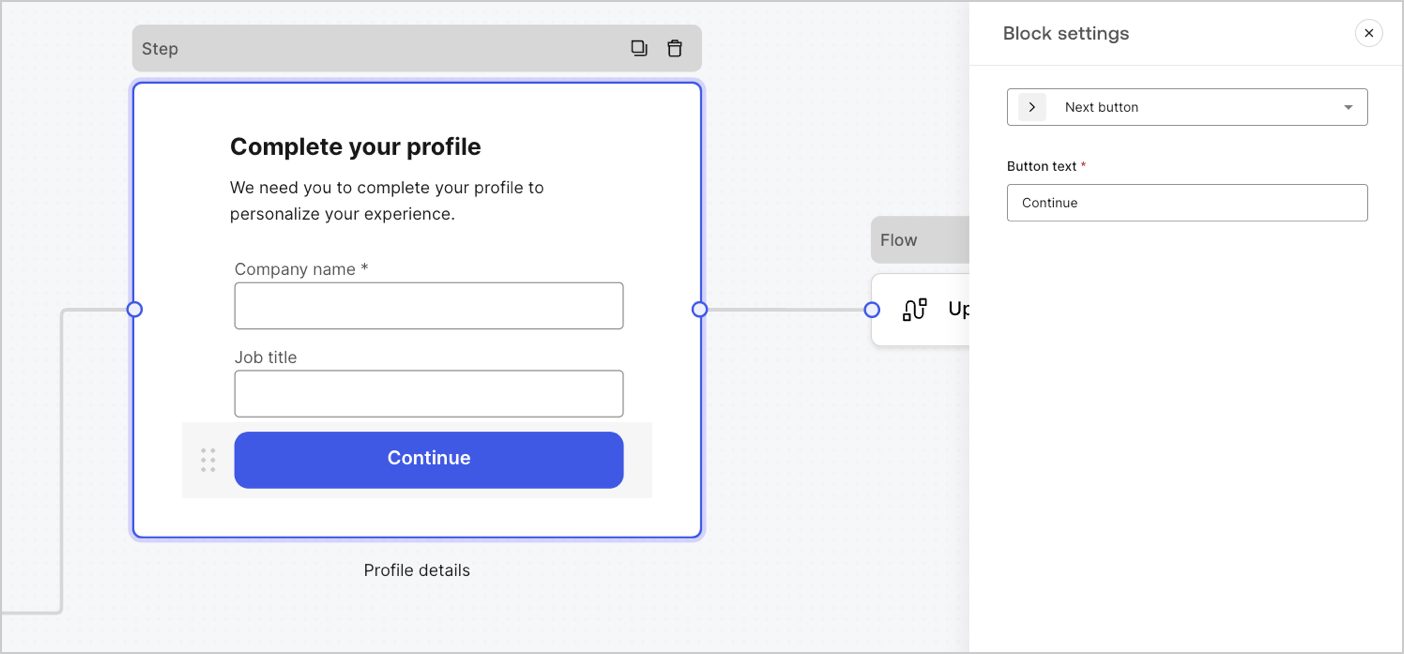
ブロックは、フォームに機能を追加するためのUIコンポーネントで、ユーザー情報は収集しません。
<Frame>
  <img src="https://mintcdn.com/docs-dev-chore-events-autoupdate/JrqAYUIkepsXuxEr/docs/images/cdy7uua7fh8z/7IijftJnuwcevL4bdHiaKw/f0376ca75303bb58d0df87e6af75e347/forms-block.png?fit=max&auto=format&n=JrqAYUIkepsXuxEr&q=85&s=f218bf8e54072a9b430bdcc695421c11" alt="Dashboard > Forms > コンポーネント > ブロック" data-og-width="1404" width="1404" data-og-height="654" height="654" data-path="docs/images/cdy7uua7fh8z/7IijftJnuwcevL4bdHiaKw/f0376ca75303bb58d0df87e6af75e347/forms-block.png" data-optimize="true" data-opv="3" srcset="https://mintcdn.com/docs-dev-chore-events-autoupdate/JrqAYUIkepsXuxEr/docs/images/cdy7uua7fh8z/7IijftJnuwcevL4bdHiaKw/f0376ca75303bb58d0df87e6af75e347/forms-block.png?w=280&fit=max&auto=format&n=JrqAYUIkepsXuxEr&q=85&s=b7ae6a4ebbad95e2e347d67bdd490749 280w, https://mintcdn.com/docs-dev-chore-events-autoupdate/JrqAYUIkepsXuxEr/docs/images/cdy7uua7fh8z/7IijftJnuwcevL4bdHiaKw/f0376ca75303bb58d0df87e6af75e347/forms-block.png?w=560&fit=max&auto=format&n=JrqAYUIkepsXuxEr&q=85&s=504156b36e6014c1248eb7e54e14b06e 560w, https://mintcdn.com/docs-dev-chore-events-autoupdate/JrqAYUIkepsXuxEr/docs/images/cdy7uua7fh8z/7IijftJnuwcevL4bdHiaKw/f0376ca75303bb58d0df87e6af75e347/forms-block.png?w=840&fit=max&auto=format&n=JrqAYUIkepsXuxEr&q=85&s=44de2dececd4357b3d93ca15ecace318 840w, https://mintcdn.com/docs-dev-chore-events-autoupdate/JrqAYUIkepsXuxEr/docs/images/cdy7uua7fh8z/7IijftJnuwcevL4bdHiaKw/f0376ca75303bb58d0df87e6af75e347/forms-block.png?w=1100&fit=max&auto=format&n=JrqAYUIkepsXuxEr&q=85&s=05dbb2526cb56ed6811f80e219817ab1 1100w, https://mintcdn.com/docs-dev-chore-events-autoupdate/JrqAYUIkepsXuxEr/docs/images/cdy7uua7fh8z/7IijftJnuwcevL4bdHiaKw/f0376ca75303bb58d0df87e6af75e347/forms-block.png?w=1650&fit=max&auto=format&n=JrqAYUIkepsXuxEr&q=85&s=2143489d2b98f2f83d6eb88241e77c10 1650w, https://mintcdn.com/docs-dev-chore-events-autoupdate/JrqAYUIkepsXuxEr/docs/images/cdy7uua7fh8z/7IijftJnuwcevL4bdHiaKw/f0376ca75303bb58d0df87e6af75e347/forms-block.png?w=2500&fit=max&auto=format&n=JrqAYUIkepsXuxEr&q=85&s=126abf5c480f60fae945a4f484df0ce5 2500w" />
</Frame>

<h4 id="available-blocks-in-forms">
  Forms で使用できるブロック
</h4>

使用できるブロックは次のとおりです。

<AccordionGroup>
  <Accordion title="次へボタンブロック">
    ユーザーが次のフォームノードに進むためのボタンです。

    <Callout icon="file-lines" color="#0EA5E9" iconType="regular">
      * 続行前に、フィールドのバリデーションルールがクライアント側とサーバー側の両方で適用・検証されます。バリデーションに失敗した場合は、ユーザーが内容を確認できるようエラーメッセージが表示されます。
      * 次のノードがフローノードの場合は、フローが完了するまでスピナーが表示されます。フローが失敗した場合、またはカスタムエラーメッセージが返された場合は、エラーメッセージが表示されます。
    </Callout>
  </Accordion>

  <Accordion title="戻るボタンブロック">
    ユーザーが前のステップノードに戻るためのボタンです。

    <Callout icon="file-lines" color="#0EA5E9" iconType="regular">
      ユーザーが戻るボタンを選択した場合、続行前に入力データが変更されていなくても、フィールドのバリデーションルールが再実行されます。
    </Callout>
  </Accordion>

  <Accordion title="ジャンプボタンブロック">
    ユーザーが現在のステップをスキップして、遷移先ノードに直接移動するためのボタンです。

    <Callout icon="file-lines" color="#0EA5E9" iconType="regular">
      現在のステップをスキップする場合、そのステップで入力された情報は検証も収集もされません。
    </Callout>
  </Accordion>

  <Accordion title="再送ボタンブロック">
    ユーザーがフローを再実行して、新しい OTP コードを生成・送信できるコンポーネントです。

    <Callout icon="file-lines" color="#0EA5E9" iconType="regular">
      ユーザーが再送ボタンを選択すると、関連するフローによって新しい OTP コードが生成され、送信されます。
    </Callout>

    | Settings | Description |
    | - | - |
    | Text alignment | テキストの配置を左、中央、右から選択します |
    | Text | ユーザーが再送ボタンを選択したときに表示されるデフォルトのテキスト |
    | Button text | ボタンのテキスト |
    | Waiting text | ユーザーが再送ボタンを選択したときに表示されるテキストです。`Text` および `Button text` の設定の代わりに表示されます。`“{{remaining_seconds}}”` 変数を使用すると、送信ボタンが再び有効になるまでの残り秒数を動的に表示できます。例: “`{{remaining_seconds}}` 秒後に再送” |
    | Flow | ユーザーが再送ボタンを選択した後に実行されるフロー |
    | Max attempts | ユーザーが再送ボタンを選択できる最大回数 |
    | Waiting time | 試行間の待機時間 (秒) |
  </Accordion>

  <Accordion title="リッチテキストブロック">
    追加情報を表示してステップノードをカスタマイズするためのリッチテキストブロックです。
  </Accordion>

  <Accordion title="区切り線ブロック">
    ステップノード内の異なるセクションを区切るための線です。短いテキストを含めることもできます。
  </Accordion>

  <Accordion title="HTML ブロック">
    カスタム UI を作成するための HTML ブロックです。
  </Accordion>

  <Accordion title="画像ブロック">
    画像を追加してステップをカスタマイズするための画像ブロックです。
  </Accordion>
</AccordionGroup>

<h3 id="widgets-components">
  Widgets コンポーネント
</h3>

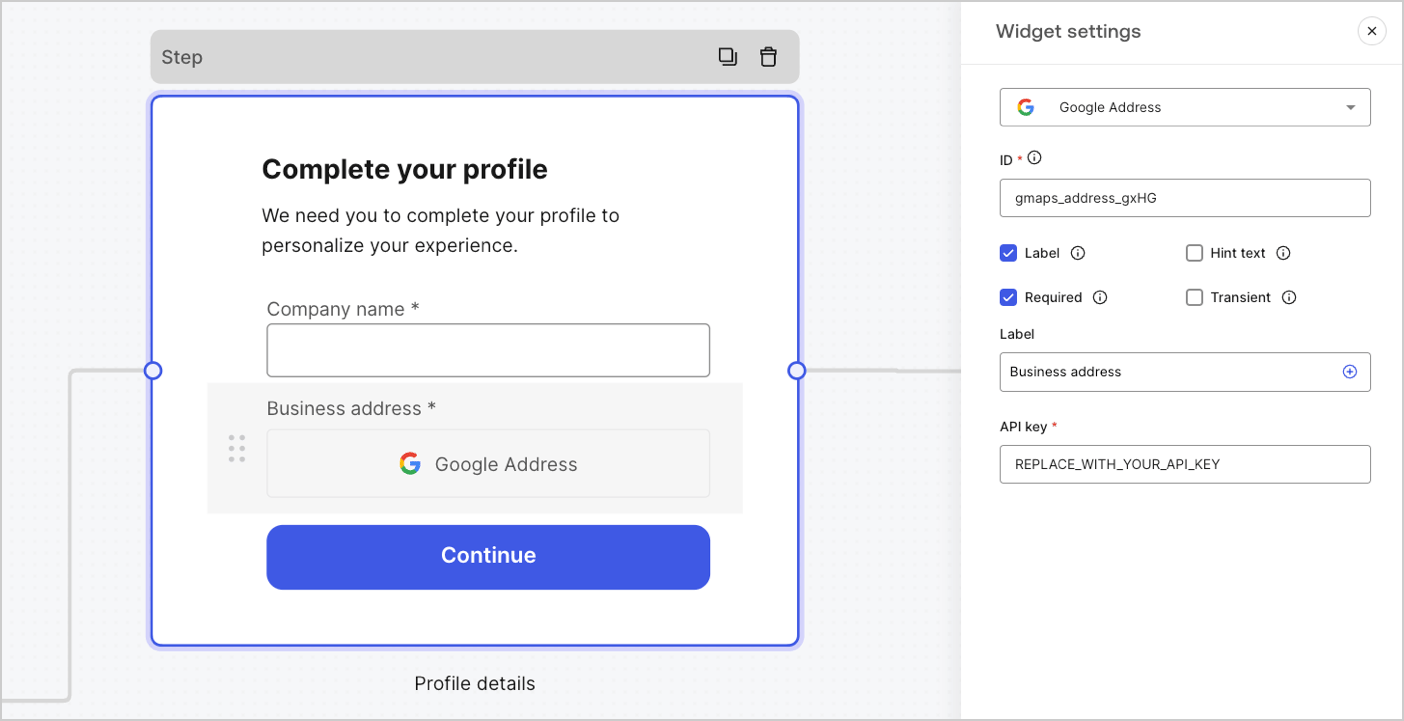
Widgets は、サードパーティ連携が組み込まれた事前構築済みのコンポーネントで、フォームにクライアントサイドとサーバーサイドのロジックを追加できます。
<Frame>
  <img src="https://mintcdn.com/docs-dev-chore-events-autoupdate/C-wLBWI5GtiUYTuO/docs/images/cdy7uua7fh8z/3J0IuWLP7utOPKSHc82IE9/a523afe0c240c63f714ef5fb102f8dab/forms-widget.png?fit=max&auto=format&n=C-wLBWI5GtiUYTuO&q=85&s=3750fda50d24edf1b3fb448b6081ee5a" alt="Dashboard > Forms > Components > Widget" data-og-width="1404" width="1404" data-og-height="721" height="721" data-path="docs/images/cdy7uua7fh8z/3J0IuWLP7utOPKSHc82IE9/a523afe0c240c63f714ef5fb102f8dab/forms-widget.png" data-optimize="true" data-opv="3" srcset="https://mintcdn.com/docs-dev-chore-events-autoupdate/C-wLBWI5GtiUYTuO/docs/images/cdy7uua7fh8z/3J0IuWLP7utOPKSHc82IE9/a523afe0c240c63f714ef5fb102f8dab/forms-widget.png?w=280&fit=max&auto=format&n=C-wLBWI5GtiUYTuO&q=85&s=ef21cc508d6d06ebad93aebe57359888 280w, https://mintcdn.com/docs-dev-chore-events-autoupdate/C-wLBWI5GtiUYTuO/docs/images/cdy7uua7fh8z/3J0IuWLP7utOPKSHc82IE9/a523afe0c240c63f714ef5fb102f8dab/forms-widget.png?w=560&fit=max&auto=format&n=C-wLBWI5GtiUYTuO&q=85&s=82337b826cac720100c8cc55ab53d5b8 560w, https://mintcdn.com/docs-dev-chore-events-autoupdate/C-wLBWI5GtiUYTuO/docs/images/cdy7uua7fh8z/3J0IuWLP7utOPKSHc82IE9/a523afe0c240c63f714ef5fb102f8dab/forms-widget.png?w=840&fit=max&auto=format&n=C-wLBWI5GtiUYTuO&q=85&s=ff79d96c9b01856cad1bbfc99d23d1c0 840w, https://mintcdn.com/docs-dev-chore-events-autoupdate/C-wLBWI5GtiUYTuO/docs/images/cdy7uua7fh8z/3J0IuWLP7utOPKSHc82IE9/a523afe0c240c63f714ef5fb102f8dab/forms-widget.png?w=1100&fit=max&auto=format&n=C-wLBWI5GtiUYTuO&q=85&s=48cde5d228675d07669b4f7cfc212ea0 1100w, https://mintcdn.com/docs-dev-chore-events-autoupdate/C-wLBWI5GtiUYTuO/docs/images/cdy7uua7fh8z/3J0IuWLP7utOPKSHc82IE9/a523afe0c240c63f714ef5fb102f8dab/forms-widget.png?w=1650&fit=max&auto=format&n=C-wLBWI5GtiUYTuO&q=85&s=d70352cc48d4545826ecf2cfc08b63a3 1650w, https://mintcdn.com/docs-dev-chore-events-autoupdate/C-wLBWI5GtiUYTuO/docs/images/cdy7uua7fh8z/3J0IuWLP7utOPKSHc82IE9/a523afe0c240c63f714ef5fb102f8dab/forms-widget.png?w=2500&fit=max&auto=format&n=C-wLBWI5GtiUYTuO&q=85&s=7847003192a68d4e5c7650b967bf067f 2500w" />
</Frame>

<h4 id="available-widgets-in-forms">
  Forms で使用できるウィジェット
</h4>

使用できるウィジェットは次のとおりです。

<AccordionGroup>
  <Accordion title="Google Address ウィジェット">
    ユーザーが住所を入力して検証できるウィジェットです。

    <h5 id="google-address-widget-settings">
      Google Address ウィジェットの設定
    </h5>

    Google Address ウィジェットの設定は次のとおりです。

    | Settings | Description |
    | - | - |
    | API key | リクエストの認証には Google Maps API キーが必要です。 |

    <h5 id="google-address-widget-output-value">
      Google Address ウィジェットの出力値
    </h5>

    Google Address ウィジェットの出力値のデータ型は `object` です。

    ```json lines theme={null}
    {
      "google_address_widget_id": {
        "type": "Feature",
        "geometry": {
          "type": "Point",
          "coordinates": [
            -73.9654415,
            40.8054491
          ]
        },
        "properties": {
          "geocoding": {
            "type": "house",
            "housenumber": "2880",
            "street": "Broadway",
            "city": "New York",
            "county": "New York County",
            "state": "New York",
            "country": "United States",
            "postcode": "10025"
          }
        }
      }
    }
    ```
  </Accordion>

  <Accordion title="Google reCAPTCHA">
    ユーザーが人間でありボットではないことを検証することで、Web サイトをスパムや不正利用から保護するのに役立つウィジェットです。

    このウィジェットでは、次のタイプをサポートしています。

    * スコアベース (v3)
    * チャレンジ (v2)

      * 非表示の reCAPTCHA バッジ

    `v2` と `v3` の違い:

    * `v2` では、チェックボックスをクリックしたりパズルを解いたりするなど、表示されるチャレンジに対するユーザー操作が必要です。
    * `v3` はバックグラウンドで実行され、ユーザー操作なしで、ユーザーの行動に基づくスコアを提供します。このバージョンを使用する場合は、スコアを処理し、追加の対応が必要かどうかを判断するためのビジネスロジックを必ず実装してください。

    <h5 id="google-recaptcha-widget-settings">
      Google reCAPTCHA ウィジェットの設定
    </h5>

    Google reCAPTCHA ウィジェットの設定は次のとおりです。

    | Settings | Description |
    | - | - |
    | Site key | Web サイトで reCAPTCHA を初期化するために使用する公開サイトキーです。[Google reCAPTCHA console](https://www.google.com/recaptcha/admin/create) または Google Cloud Platform プロジェクトで作成できます。 |
    | Secret key | サーバー側で reCAPTCHA サービスと安全に通信するために使用するシークレットキーです。[Google reCAPTCHA console](https://www.google.com/recaptcha/admin/create) または Google Cloud Platform プロジェクトで作成できます。 |

    <h5 id="google-recaptcha-output-value">
      Google reCAPTCHA の出力値
    </h5>

    Google reCAPTCHA ウィジェットの出力値のデータ型は `object` です。

    `v2` レスポンスの例:

    ```json lines theme={null}
    {
      "recaptcha_widget_id": {
        "success": true,
        "challenge_ts": "2025-03-26T11:22:18Z",
        "hostname": "auth.example.com"
      }
    }
    ```

    `v3` レスポンスの例:

    ```json lines theme={null}
    {
      "recaptcha_widget_id": {
        "success": true,
        "challenge_ts": "2025-03-26T11:22:18Z",
        "hostname": "auth.example.com",
        "score": 0.9
      }
    }
    ```
  </Accordion>

  <Accordion title="Verifiable Credentials">
    デジタルウォレットに保存された検証可能な資格情報を使用して、ユーザーが本人確認を行えるようにするウィジェットです。

    <h5 id="verifiable-credentials-widget-settings">
      Verifiable Credentials ウィジェットの設定
    </h5>

    Verifiable Credentials ウィジェットの設定は次のとおりです。

    | Settings | Description |
    | - | - |
    | URL | QR コードの生成に使用する URL 値です。この値は、検証リクエストの `engagement` プロパティで返されます。 |
    | Link text | QR コードをスキャンできず、代わりに自分のデバイスでリンクを直接開きたいユーザー向けに表示される代替テキストです。 |
    | Size | QR コードのサイズです。 |
    | Public token | ポーリングエンドポイントを利用するために必要なアクセストークンです。他のリソースへのアクセスが公開されないよう、このトークンは `read:verification_request` スコープのみで生成されていることを確認してください。 |
    | Verification ID | 検証リクエストの開始時に生成される検証 ID です。 |
    | Maximum waiting time | 検証プロセスの完了を待機する最大時間です。設定した時間に達すると、検証ステータスに関係なくポーリングは停止し、エラーがスローされます。 |

    <h5 id="verifiable-credentials-output-value">
      Verifiable Credentials の出力値
    </h5>

    Verifiable Credentials ウィジェットの出力値のデータ型は `object` です。

    ```json lines theme={null}
    {
      "verifiable_credentials_widget_id": {
        "state": "honored",
        "reason": "...", // reason フィールドには、検証リクエストの state に関する追加情報（利用可能な場合）が含まれます。 
        "presentation": {} // presentation には、presentation definition への応答としてウォレットから提供されたクレームが含まれます。
      }
    }
    ```
  </Accordion>
</AccordionGroup>

<h2 id="router-node">
  ルーターノード
</h2>

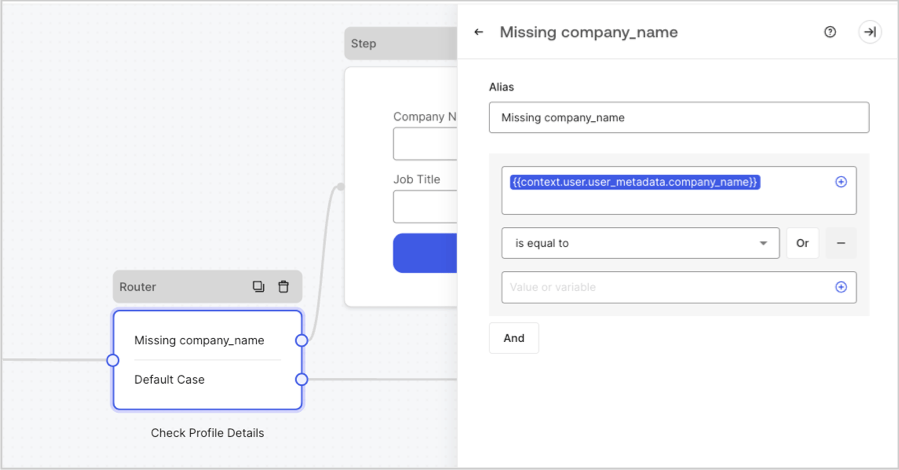
ルーターノードでは、ルールを追加して、ノード間の条件分岐を作成できます。

デフォルトでは、ルーターノードには **Default Case** という名前の通過ルールが 1 つあり、他のノードに接続されます。さらに、変数が満たす条件のセットに基づいてルールを追加し、他のノードに接続できます。詳しくは、[Router](/docs/ja-jp/customize/forms/routers) をご覧ください。
<Frame>
  <img src="https://mintcdn.com/docs-dev-chore-events-autoupdate/MOUmiRXu5I_3fPz2/docs/images/cdy7uua7fh8z/2IKI9sU9UPCVkMkHQ3G8lX/07df765647a69a4cf1ab8c5c7aae3c22/2025-07-15_10-31-08.png?fit=max&auto=format&n=MOUmiRXu5I_3fPz2&q=85&s=8fb12b32139c083fcda6117d77a26000" alt="Dashboard > Forms > Routers " data-og-width="899" width="899" data-og-height="470" height="470" data-path="docs/images/cdy7uua7fh8z/2IKI9sU9UPCVkMkHQ3G8lX/07df765647a69a4cf1ab8c5c7aae3c22/2025-07-15_10-31-08.png" data-optimize="true" data-opv="3" srcset="https://mintcdn.com/docs-dev-chore-events-autoupdate/MOUmiRXu5I_3fPz2/docs/images/cdy7uua7fh8z/2IKI9sU9UPCVkMkHQ3G8lX/07df765647a69a4cf1ab8c5c7aae3c22/2025-07-15_10-31-08.png?w=280&fit=max&auto=format&n=MOUmiRXu5I_3fPz2&q=85&s=00a8a86511329d5415f50f45efa1f170 280w, https://mintcdn.com/docs-dev-chore-events-autoupdate/MOUmiRXu5I_3fPz2/docs/images/cdy7uua7fh8z/2IKI9sU9UPCVkMkHQ3G8lX/07df765647a69a4cf1ab8c5c7aae3c22/2025-07-15_10-31-08.png?w=560&fit=max&auto=format&n=MOUmiRXu5I_3fPz2&q=85&s=5ea67274b41ccedc7508952bdcc14774 560w, https://mintcdn.com/docs-dev-chore-events-autoupdate/MOUmiRXu5I_3fPz2/docs/images/cdy7uua7fh8z/2IKI9sU9UPCVkMkHQ3G8lX/07df765647a69a4cf1ab8c5c7aae3c22/2025-07-15_10-31-08.png?w=840&fit=max&auto=format&n=MOUmiRXu5I_3fPz2&q=85&s=956be53d9293c7ba9635700aad236c8f 840w, https://mintcdn.com/docs-dev-chore-events-autoupdate/MOUmiRXu5I_3fPz2/docs/images/cdy7uua7fh8z/2IKI9sU9UPCVkMkHQ3G8lX/07df765647a69a4cf1ab8c5c7aae3c22/2025-07-15_10-31-08.png?w=1100&fit=max&auto=format&n=MOUmiRXu5I_3fPz2&q=85&s=eedf47fc35cba6c33a8640e24495f513 1100w, https://mintcdn.com/docs-dev-chore-events-autoupdate/MOUmiRXu5I_3fPz2/docs/images/cdy7uua7fh8z/2IKI9sU9UPCVkMkHQ3G8lX/07df765647a69a4cf1ab8c5c7aae3c22/2025-07-15_10-31-08.png?w=1650&fit=max&auto=format&n=MOUmiRXu5I_3fPz2&q=85&s=b0723b6e6cb6c118c207463d5c7a3ab3 1650w, https://mintcdn.com/docs-dev-chore-events-autoupdate/MOUmiRXu5I_3fPz2/docs/images/cdy7uua7fh8z/2IKI9sU9UPCVkMkHQ3G8lX/07df765647a69a4cf1ab8c5c7aae3c22/2025-07-15_10-31-08.png?w=2500&fit=max&auto=format&n=MOUmiRXu5I_3fPz2&q=85&s=9284c0409d9891cc0e570c7b7587582e 2500w" />
</Frame>

<h2 id="flow-node">
  フローノード
</h2>

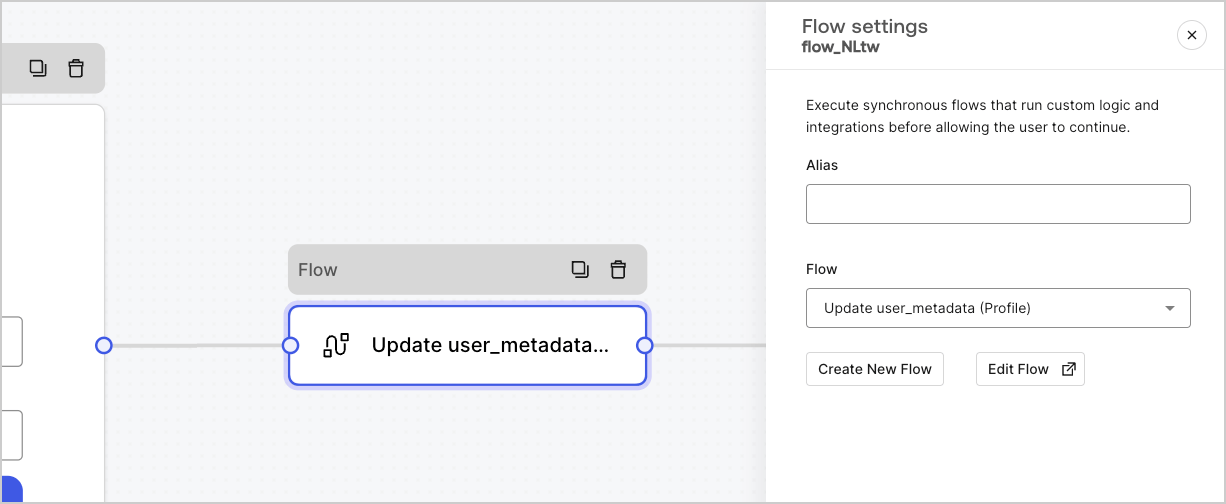
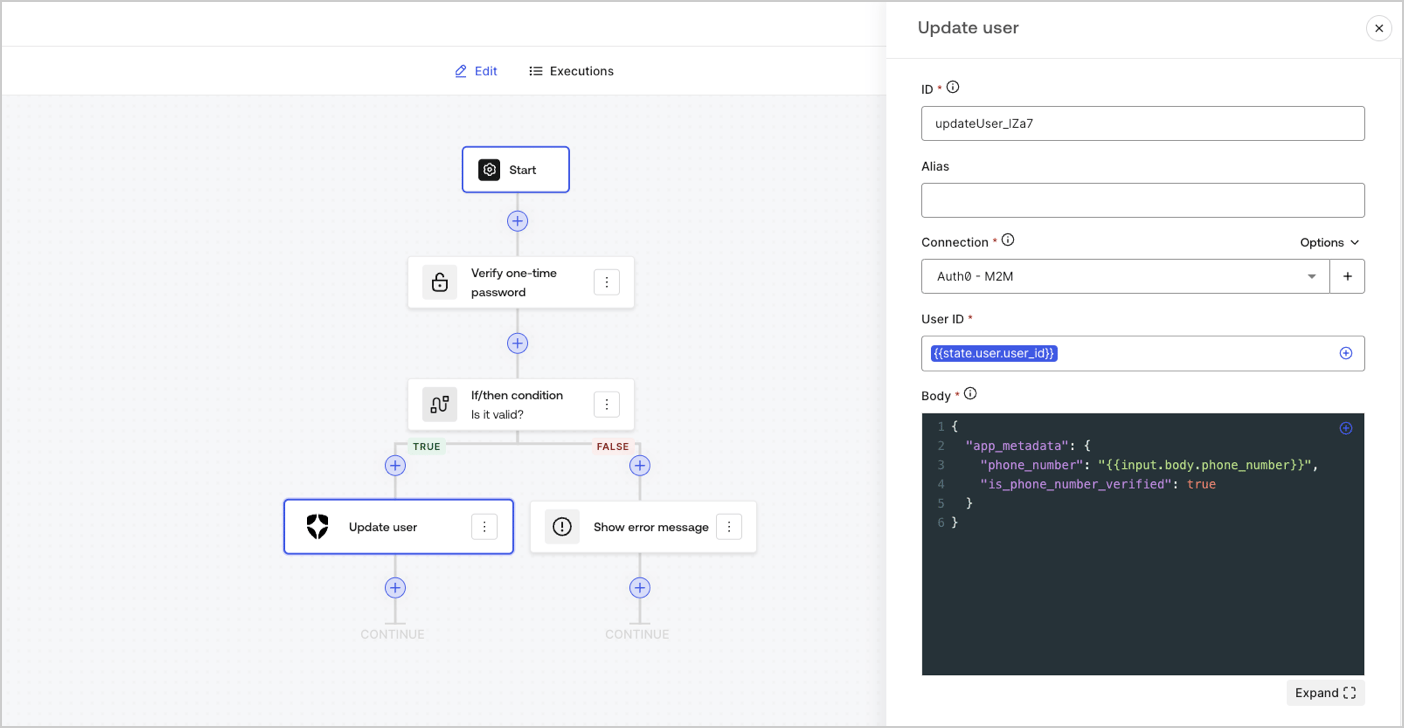
フローノードを使用すると、フォームにカスタムロジックや統合フローを追加し、作成できます。詳しくは、[Flows](/docs/ja-jp/customize/forms/flows)をご覧ください。
<Frame>
  <img src="https://mintcdn.com/docs-dev-chore-events-autoupdate/zUYE0uCEntUxkkyV/docs/images/cdy7uua7fh8z/4UGCrqzgyHTPryLoEuBwNt/e4a67be08a33b565ece89973028fa6ac/forms-flow-node.png?fit=max&auto=format&n=zUYE0uCEntUxkkyV&q=85&s=3ae8f1b757f003fa33381f137917171f" alt="Dashboard > Forms > Flow" data-og-width="1226" width="1226" data-og-height="504" height="504" data-path="docs/images/cdy7uua7fh8z/4UGCrqzgyHTPryLoEuBwNt/e4a67be08a33b565ece89973028fa6ac/forms-flow-node.png" data-optimize="true" data-opv="3" srcset="https://mintcdn.com/docs-dev-chore-events-autoupdate/zUYE0uCEntUxkkyV/docs/images/cdy7uua7fh8z/4UGCrqzgyHTPryLoEuBwNt/e4a67be08a33b565ece89973028fa6ac/forms-flow-node.png?w=280&fit=max&auto=format&n=zUYE0uCEntUxkkyV&q=85&s=a52ab92787fc6c5ca542d718a40484b9 280w, https://mintcdn.com/docs-dev-chore-events-autoupdate/zUYE0uCEntUxkkyV/docs/images/cdy7uua7fh8z/4UGCrqzgyHTPryLoEuBwNt/e4a67be08a33b565ece89973028fa6ac/forms-flow-node.png?w=560&fit=max&auto=format&n=zUYE0uCEntUxkkyV&q=85&s=692614d52e9157f009295113fd1fde02 560w, https://mintcdn.com/docs-dev-chore-events-autoupdate/zUYE0uCEntUxkkyV/docs/images/cdy7uua7fh8z/4UGCrqzgyHTPryLoEuBwNt/e4a67be08a33b565ece89973028fa6ac/forms-flow-node.png?w=840&fit=max&auto=format&n=zUYE0uCEntUxkkyV&q=85&s=0d6ec7bb349cf3a472a8fa31ba1e4999 840w, https://mintcdn.com/docs-dev-chore-events-autoupdate/zUYE0uCEntUxkkyV/docs/images/cdy7uua7fh8z/4UGCrqzgyHTPryLoEuBwNt/e4a67be08a33b565ece89973028fa6ac/forms-flow-node.png?w=1100&fit=max&auto=format&n=zUYE0uCEntUxkkyV&q=85&s=9b36084828c762fa982a77122027596a 1100w, https://mintcdn.com/docs-dev-chore-events-autoupdate/zUYE0uCEntUxkkyV/docs/images/cdy7uua7fh8z/4UGCrqzgyHTPryLoEuBwNt/e4a67be08a33b565ece89973028fa6ac/forms-flow-node.png?w=1650&fit=max&auto=format&n=zUYE0uCEntUxkkyV&q=85&s=1dc5181efdd625edccbb1e14508cb8cd 1650w, https://mintcdn.com/docs-dev-chore-events-autoupdate/zUYE0uCEntUxkkyV/docs/images/cdy7uua7fh8z/4UGCrqzgyHTPryLoEuBwNt/e4a67be08a33b565ece89973028fa6ac/forms-flow-node.png?w=2500&fit=max&auto=format&n=zUYE0uCEntUxkkyV&q=85&s=e50efa047682a0b165c8d41d01aaaf10 2500w" />
</Frame>

<Frame>
  <img src="https://mintcdn.com/docs-dev-chore-events-autoupdate/8vX6Ha0E5Oe3Sxlx/docs/images/cdy7uua7fh8z/4L1ixTcIVCmslts6M4wn7u/dc07046cfd41494f40285de5c102ff52/flow-editor-example.png?fit=max&auto=format&n=8vX6Ha0E5Oe3Sxlx&q=85&s=97833ef21dbca8a07ccf71190ab19eae" alt="Dashboard > Forms > Flow > Editor" data-og-width="1404" width="1404" data-og-height="728" height="728" data-path="docs/images/cdy7uua7fh8z/4L1ixTcIVCmslts6M4wn7u/dc07046cfd41494f40285de5c102ff52/flow-editor-example.png" data-optimize="true" data-opv="3" srcset="https://mintcdn.com/docs-dev-chore-events-autoupdate/8vX6Ha0E5Oe3Sxlx/docs/images/cdy7uua7fh8z/4L1ixTcIVCmslts6M4wn7u/dc07046cfd41494f40285de5c102ff52/flow-editor-example.png?w=280&fit=max&auto=format&n=8vX6Ha0E5Oe3Sxlx&q=85&s=b0df9becf1ea5db9689be034b931fd0d 280w, https://mintcdn.com/docs-dev-chore-events-autoupdate/8vX6Ha0E5Oe3Sxlx/docs/images/cdy7uua7fh8z/4L1ixTcIVCmslts6M4wn7u/dc07046cfd41494f40285de5c102ff52/flow-editor-example.png?w=560&fit=max&auto=format&n=8vX6Ha0E5Oe3Sxlx&q=85&s=8fd5b2432b9e3a6ca99a727c211d01f5 560w, https://mintcdn.com/docs-dev-chore-events-autoupdate/8vX6Ha0E5Oe3Sxlx/docs/images/cdy7uua7fh8z/4L1ixTcIVCmslts6M4wn7u/dc07046cfd41494f40285de5c102ff52/flow-editor-example.png?w=840&fit=max&auto=format&n=8vX6Ha0E5Oe3Sxlx&q=85&s=ca00273115f900136191a9826da38d20 840w, https://mintcdn.com/docs-dev-chore-events-autoupdate/8vX6Ha0E5Oe3Sxlx/docs/images/cdy7uua7fh8z/4L1ixTcIVCmslts6M4wn7u/dc07046cfd41494f40285de5c102ff52/flow-editor-example.png?w=1100&fit=max&auto=format&n=8vX6Ha0E5Oe3Sxlx&q=85&s=ba914dc7bffc7abe46f2b26d11e80d30 1100w, https://mintcdn.com/docs-dev-chore-events-autoupdate/8vX6Ha0E5Oe3Sxlx/docs/images/cdy7uua7fh8z/4L1ixTcIVCmslts6M4wn7u/dc07046cfd41494f40285de5c102ff52/flow-editor-example.png?w=1650&fit=max&auto=format&n=8vX6Ha0E5Oe3Sxlx&q=85&s=d90ba282c7ae84073f76745a2daf9bb4 1650w, https://mintcdn.com/docs-dev-chore-events-autoupdate/8vX6Ha0E5Oe3Sxlx/docs/images/cdy7uua7fh8z/4L1ixTcIVCmslts6M4wn7u/dc07046cfd41494f40285de5c102ff52/flow-editor-example.png?w=2500&fit=max&auto=format&n=8vX6Ha0E5Oe3Sxlx&q=85&s=422d2e570d635d3ff5946f8e9daf999f 2500w" />
</Frame>

<h2 id="start-node">
  開始ノード
</h2>

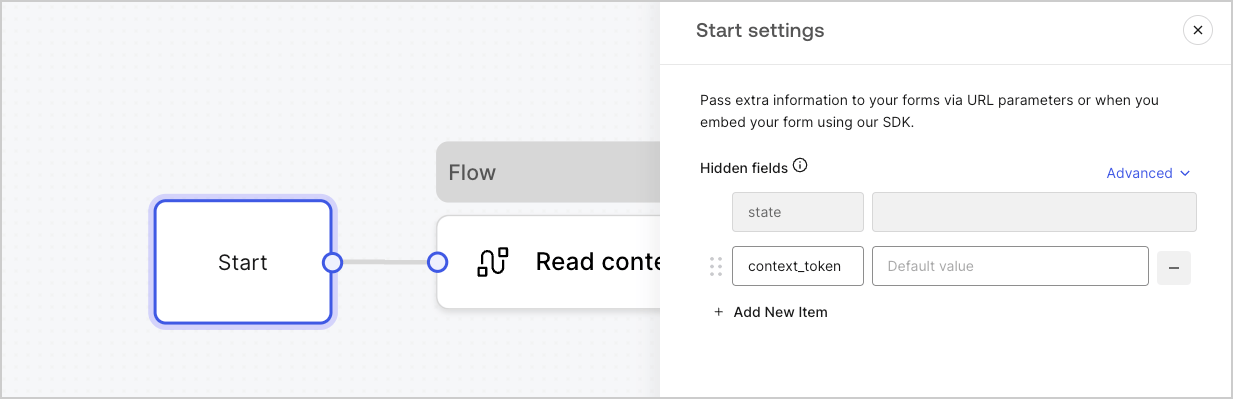
開始ノードはユーザーには表示されません。ここでは、[Action を使用してフォームをレンダリングする](/docs/ja-jp/customize/forms/render)際のユーザー属性など、非表示フィールド変数を設定できます。
<Frame>
  <img src="https://mintcdn.com/docs-dev-chore-events-autoupdate/MOUmiRXu5I_3fPz2/docs/images/cdy7uua7fh8z/2GqFDPep4akUxucmMJyb5/2b50f07f50ee29501341dc54f686de07/form-start-node.png?fit=max&auto=format&n=MOUmiRXu5I_3fPz2&q=85&s=9c1bca6af3d8d2260b35a0cbf799cb08" alt="Dashboard > Forms > 開始ノード" data-og-width="1233" width="1233" data-og-height="399" height="399" data-path="docs/images/cdy7uua7fh8z/2GqFDPep4akUxucmMJyb5/2b50f07f50ee29501341dc54f686de07/form-start-node.png" data-optimize="true" data-opv="3" srcset="https://mintcdn.com/docs-dev-chore-events-autoupdate/MOUmiRXu5I_3fPz2/docs/images/cdy7uua7fh8z/2GqFDPep4akUxucmMJyb5/2b50f07f50ee29501341dc54f686de07/form-start-node.png?w=280&fit=max&auto=format&n=MOUmiRXu5I_3fPz2&q=85&s=e2c32c405d194cf9f475f8b6f29de3bf 280w, https://mintcdn.com/docs-dev-chore-events-autoupdate/MOUmiRXu5I_3fPz2/docs/images/cdy7uua7fh8z/2GqFDPep4akUxucmMJyb5/2b50f07f50ee29501341dc54f686de07/form-start-node.png?w=560&fit=max&auto=format&n=MOUmiRXu5I_3fPz2&q=85&s=d434a49f4fca71b43a9b1269ee3d6fc0 560w, https://mintcdn.com/docs-dev-chore-events-autoupdate/MOUmiRXu5I_3fPz2/docs/images/cdy7uua7fh8z/2GqFDPep4akUxucmMJyb5/2b50f07f50ee29501341dc54f686de07/form-start-node.png?w=840&fit=max&auto=format&n=MOUmiRXu5I_3fPz2&q=85&s=b1d2d05c656ab7915b0b26c6a7d68c58 840w, https://mintcdn.com/docs-dev-chore-events-autoupdate/MOUmiRXu5I_3fPz2/docs/images/cdy7uua7fh8z/2GqFDPep4akUxucmMJyb5/2b50f07f50ee29501341dc54f686de07/form-start-node.png?w=1100&fit=max&auto=format&n=MOUmiRXu5I_3fPz2&q=85&s=1e6fe17df96e5b5ca2d1e37e22ff473a 1100w, https://mintcdn.com/docs-dev-chore-events-autoupdate/MOUmiRXu5I_3fPz2/docs/images/cdy7uua7fh8z/2GqFDPep4akUxucmMJyb5/2b50f07f50ee29501341dc54f686de07/form-start-node.png?w=1650&fit=max&auto=format&n=MOUmiRXu5I_3fPz2&q=85&s=394febee59be9d1dd3eccef43f6d5866 1650w, https://mintcdn.com/docs-dev-chore-events-autoupdate/MOUmiRXu5I_3fPz2/docs/images/cdy7uua7fh8z/2GqFDPep4akUxucmMJyb5/2b50f07f50ee29501341dc54f686de07/form-start-node.png?w=2500&fit=max&auto=format&n=MOUmiRXu5I_3fPz2&q=85&s=afa9dcf10c72346e611f1cef1929b171 2500w" />
</Frame>

<h2 id="ending-screen-node">
  終了画面ノード
</h2>

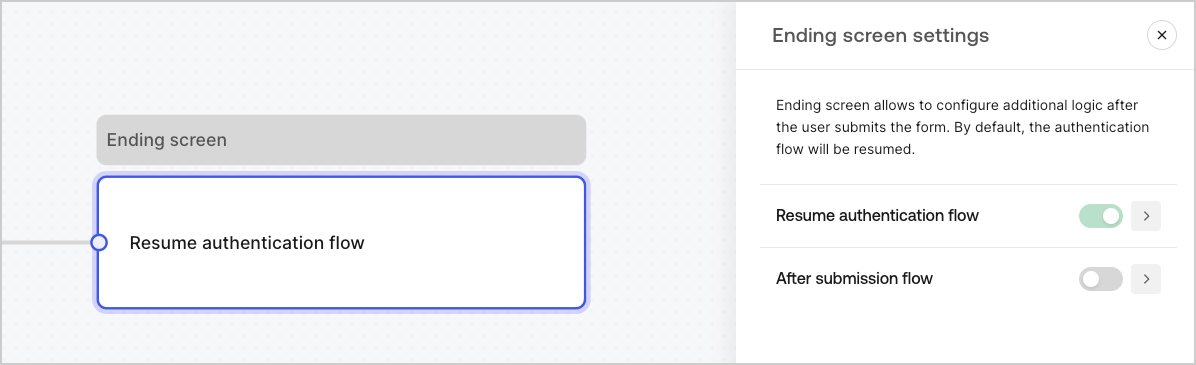
すべてのフォームには終了画面ノードがあります。既定では、このノードで認証フローが再開され、ここで送信後フローを設定できます。
<Frame>
  <img src="https://mintcdn.com/docs-dev-chore-events-autoupdate/TCxBOmYcNUwWTUFd/docs/images/cdy7uua7fh8z/0icbjPpDKsnmtInimJ548/ead65b5e89de57a3079127324acd314d/ending-screen-node.png?fit=max&auto=format&n=TCxBOmYcNUwWTUFd&q=85&s=0f45d12db486b35774e32c3e18215414" alt="Dashboard > Forms > 終了画面ノード" data-og-width="1196" width="1196" data-og-height="365" height="365" data-path="docs/images/cdy7uua7fh8z/0icbjPpDKsnmtInimJ548/ead65b5e89de57a3079127324acd314d/ending-screen-node.png" data-optimize="true" data-opv="3" srcset="https://mintcdn.com/docs-dev-chore-events-autoupdate/TCxBOmYcNUwWTUFd/docs/images/cdy7uua7fh8z/0icbjPpDKsnmtInimJ548/ead65b5e89de57a3079127324acd314d/ending-screen-node.png?w=280&fit=max&auto=format&n=TCxBOmYcNUwWTUFd&q=85&s=f5e4267bd69b7d7bba53618c53006f4d 280w, https://mintcdn.com/docs-dev-chore-events-autoupdate/TCxBOmYcNUwWTUFd/docs/images/cdy7uua7fh8z/0icbjPpDKsnmtInimJ548/ead65b5e89de57a3079127324acd314d/ending-screen-node.png?w=560&fit=max&auto=format&n=TCxBOmYcNUwWTUFd&q=85&s=70a2cc2f150ec0e2a71c2ece28e5b90d 560w, https://mintcdn.com/docs-dev-chore-events-autoupdate/TCxBOmYcNUwWTUFd/docs/images/cdy7uua7fh8z/0icbjPpDKsnmtInimJ548/ead65b5e89de57a3079127324acd314d/ending-screen-node.png?w=840&fit=max&auto=format&n=TCxBOmYcNUwWTUFd&q=85&s=a9f875384552c1ef8de25a7bf820daea 840w, https://mintcdn.com/docs-dev-chore-events-autoupdate/TCxBOmYcNUwWTUFd/docs/images/cdy7uua7fh8z/0icbjPpDKsnmtInimJ548/ead65b5e89de57a3079127324acd314d/ending-screen-node.png?w=1100&fit=max&auto=format&n=TCxBOmYcNUwWTUFd&q=85&s=8b2b07ddcc3102f9b0aba9c2ac5081ac 1100w, https://mintcdn.com/docs-dev-chore-events-autoupdate/TCxBOmYcNUwWTUFd/docs/images/cdy7uua7fh8z/0icbjPpDKsnmtInimJ548/ead65b5e89de57a3079127324acd314d/ending-screen-node.png?w=1650&fit=max&auto=format&n=TCxBOmYcNUwWTUFd&q=85&s=aac1dc66505993d0cabd7e3a12bab5ac 1650w, https://mintcdn.com/docs-dev-chore-events-autoupdate/TCxBOmYcNUwWTUFd/docs/images/cdy7uua7fh8z/0icbjPpDKsnmtInimJ548/ead65b5e89de57a3079127324acd314d/ending-screen-node.png?w=2500&fit=max&auto=format&n=TCxBOmYcNUwWTUFd&q=85&s=da65beddbab0bd52395f55fb95a0341e 2500w" />
</Frame>
