> ## Documentation Index
> Fetch the complete documentation index at: https://docs-dev-chore-events-autoupdate.mintlify.site/llms.txt
> Use this file to discover all available pages before exploring further.

> Form にカスタムメッセージや翻訳を追加して、各ステップでユーザーの言語設定に一致するロケール固有の文言を表示する方法を学びます。

# カスタムメッセージと翻訳

フォーム のメッセージはカスタマイズでき、ユーザーに独自の フォーム 体験を提供できます。さらに、フォームのコンポーネントやエラー、そのほかのカスタムメッセージを他言語に翻訳することで、ローカライズされた体験を実現できます。

<h2 id="messages">
  メッセージ
</h2>

フォームエディタでは、エラーメッセージをカスタマイズしたり、ユーザー向けのそのほかのカスタムメッセージを作成したりできます。

<h3 id="error-messages">
  エラーメッセージ
</h3>

フォームのデフォルトのエラーメッセージを置き換えるカスタムエラーメッセージを作成できます。

カスタムエラーメッセージを作成するには、以下の手順に従ってください。

1. Auth0 Dashboard で、**Actions > Forms** に移動します。
2. フォームエディターの左側のメニューから **Messages** を選択します。
3. **Errors** タブを選択します\*\*。\*\*
4. 対応するフィールドにカスタムエラーメッセージを入力して、デフォルトのメッセージを置き換えます。
5. **Publish** を選択して保存します。

<h3 id="custom-messages">
  カスタムメッセージ
</h3>

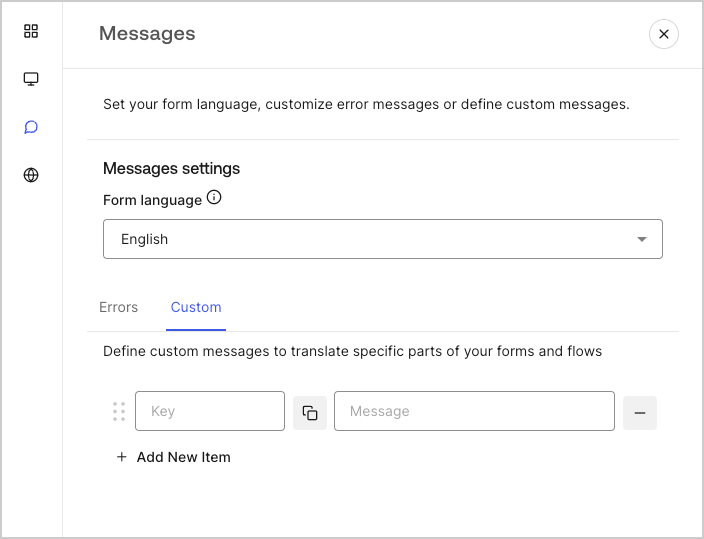
既定のメッセージに加えてカスタムメッセージを作成することで、フォーム をさらにパーソナライズできます。たとえば、フロー内で action がエラーを返したときにユーザーに表示するカスタムメッセージを追加できます。

<h4 id="create-custom-messages">
  カスタムメッセージを作成する
</h4>

カスタムメッセージを作成するには、次の手順に従います。

1. フォームエディターの左側のメニューから、**Messages** を選択します。
2. **Custom** タブを選択し、**Add New Item** を選択します。
3. 左側でメッセージの一意のキーを追加し、右側のフィールドにカスタムメッセージを入力します。
4. 保存するには、**Publish** を選択します。
<Frame>
  <img src="https://mintcdn.com/docs-dev-chore-events-autoupdate/MOUmiRXu5I_3fPz2/docs/images/cdy7uua7fh8z/1upBOwWqntPPQF8fqGeN6T/a65674d05c823c5fbe703265558693e4/custom-message.png?fit=max&auto=format&n=MOUmiRXu5I_3fPz2&q=85&s=d7c0a3949ce885587781f73dc2536998" alt="Auth0 Dashboard > Forms > カスタムメッセージと翻訳 > カスタムメッセージ" data-og-width="704" width="704" data-og-height="539" height="539" data-path="docs/images/cdy7uua7fh8z/1upBOwWqntPPQF8fqGeN6T/a65674d05c823c5fbe703265558693e4/custom-message.png" data-optimize="true" data-opv="3" srcset="https://mintcdn.com/docs-dev-chore-events-autoupdate/MOUmiRXu5I_3fPz2/docs/images/cdy7uua7fh8z/1upBOwWqntPPQF8fqGeN6T/a65674d05c823c5fbe703265558693e4/custom-message.png?w=280&fit=max&auto=format&n=MOUmiRXu5I_3fPz2&q=85&s=651ed9c836617a2a6e8b8b010af01052 280w, https://mintcdn.com/docs-dev-chore-events-autoupdate/MOUmiRXu5I_3fPz2/docs/images/cdy7uua7fh8z/1upBOwWqntPPQF8fqGeN6T/a65674d05c823c5fbe703265558693e4/custom-message.png?w=560&fit=max&auto=format&n=MOUmiRXu5I_3fPz2&q=85&s=80682f80f915d96067730a5083b37e63 560w, https://mintcdn.com/docs-dev-chore-events-autoupdate/MOUmiRXu5I_3fPz2/docs/images/cdy7uua7fh8z/1upBOwWqntPPQF8fqGeN6T/a65674d05c823c5fbe703265558693e4/custom-message.png?w=840&fit=max&auto=format&n=MOUmiRXu5I_3fPz2&q=85&s=c52d3061c10cb319a161ea752a76e9a8 840w, https://mintcdn.com/docs-dev-chore-events-autoupdate/MOUmiRXu5I_3fPz2/docs/images/cdy7uua7fh8z/1upBOwWqntPPQF8fqGeN6T/a65674d05c823c5fbe703265558693e4/custom-message.png?w=1100&fit=max&auto=format&n=MOUmiRXu5I_3fPz2&q=85&s=a4578072c33f60af2438f731ee322f13 1100w, https://mintcdn.com/docs-dev-chore-events-autoupdate/MOUmiRXu5I_3fPz2/docs/images/cdy7uua7fh8z/1upBOwWqntPPQF8fqGeN6T/a65674d05c823c5fbe703265558693e4/custom-message.png?w=1650&fit=max&auto=format&n=MOUmiRXu5I_3fPz2&q=85&s=3c4776de0c2fedc457d1a2b3f941aa8d 1650w, https://mintcdn.com/docs-dev-chore-events-autoupdate/MOUmiRXu5I_3fPz2/docs/images/cdy7uua7fh8z/1upBOwWqntPPQF8fqGeN6T/a65674d05c823c5fbe703265558693e4/custom-message.png?w=2500&fit=max&auto=format&n=MOUmiRXu5I_3fPz2&q=85&s=ea788e565dd9bec78ab5b9c70466f721 2500w" />
</Frame>

<h4 id="add-custom-messages-to-your-forms">
  フォームにカスタムメッセージを追加する
</h4>

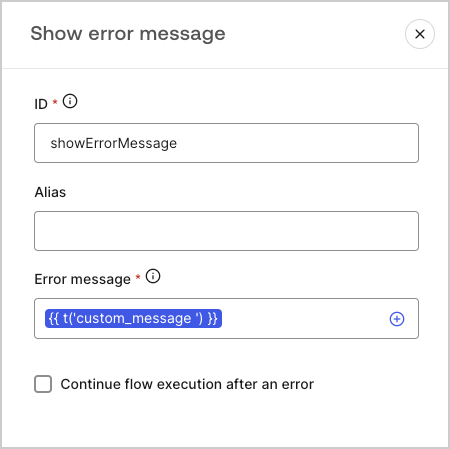
フォーム内でカスタムメッセージを参照するには、カスタムメッセージの一意のキーを指定して、関数 `{{t('custom_unique_key')}}` を使用します。
<Frame>
  <img src="https://mintcdn.com/docs-dev-chore-events-autoupdate/8vX6Ha0E5Oe3Sxlx/docs/images/cdy7uua7fh8z/45p4V7w5gw7DQZyJ08ECSH/d040720d9aa19f6e97e21defcd428e55/translation-function.png?fit=max&auto=format&n=8vX6Ha0E5Oe3Sxlx&q=85&s=d2cca7434240defa17675e33bac9a23e" alt="Auth0 Dashboard > Forms > Custom messages and translations > Translation function" data-og-width="450" width="450" data-og-height="449" height="449" data-path="docs/images/cdy7uua7fh8z/45p4V7w5gw7DQZyJ08ECSH/d040720d9aa19f6e97e21defcd428e55/translation-function.png" data-optimize="true" data-opv="3" srcset="https://mintcdn.com/docs-dev-chore-events-autoupdate/8vX6Ha0E5Oe3Sxlx/docs/images/cdy7uua7fh8z/45p4V7w5gw7DQZyJ08ECSH/d040720d9aa19f6e97e21defcd428e55/translation-function.png?w=280&fit=max&auto=format&n=8vX6Ha0E5Oe3Sxlx&q=85&s=1941851f3a4d7f3ebbac3a77bd752bd3 280w, https://mintcdn.com/docs-dev-chore-events-autoupdate/8vX6Ha0E5Oe3Sxlx/docs/images/cdy7uua7fh8z/45p4V7w5gw7DQZyJ08ECSH/d040720d9aa19f6e97e21defcd428e55/translation-function.png?w=560&fit=max&auto=format&n=8vX6Ha0E5Oe3Sxlx&q=85&s=f6aa3fee1f61c79292b89f317e39522f 560w, https://mintcdn.com/docs-dev-chore-events-autoupdate/8vX6Ha0E5Oe3Sxlx/docs/images/cdy7uua7fh8z/45p4V7w5gw7DQZyJ08ECSH/d040720d9aa19f6e97e21defcd428e55/translation-function.png?w=840&fit=max&auto=format&n=8vX6Ha0E5Oe3Sxlx&q=85&s=5191a0516d854d87d0a90b343ad5eed9 840w, https://mintcdn.com/docs-dev-chore-events-autoupdate/8vX6Ha0E5Oe3Sxlx/docs/images/cdy7uua7fh8z/45p4V7w5gw7DQZyJ08ECSH/d040720d9aa19f6e97e21defcd428e55/translation-function.png?w=1100&fit=max&auto=format&n=8vX6Ha0E5Oe3Sxlx&q=85&s=029978aaeb1f7a75616dda361c08c748 1100w, https://mintcdn.com/docs-dev-chore-events-autoupdate/8vX6Ha0E5Oe3Sxlx/docs/images/cdy7uua7fh8z/45p4V7w5gw7DQZyJ08ECSH/d040720d9aa19f6e97e21defcd428e55/translation-function.png?w=1650&fit=max&auto=format&n=8vX6Ha0E5Oe3Sxlx&q=85&s=10c7e1992105247404863f449d9e2a01 1650w, https://mintcdn.com/docs-dev-chore-events-autoupdate/8vX6Ha0E5Oe3Sxlx/docs/images/cdy7uua7fh8z/45p4V7w5gw7DQZyJ08ECSH/d040720d9aa19f6e97e21defcd428e55/translation-function.png?w=2500&fit=max&auto=format&n=8vX6Ha0E5Oe3Sxlx&q=85&s=f5e477cbcfb0989b34925f851dcec7b4 2500w" />
</Frame>

<h2 id="translations">
  翻訳
</h2>

Translations 機能を使うと、フォームを多言語対応にして、国際的なユーザー体験を提供できます。この機能では、ユーザーのブラウザー言語に基づいて、フォームに適した言語が判断されます。
デフォルトでは、一部の標準エラーメッセージについてスペイン語の翻訳が用意されています。ただし、より質の高いユーザー体験を実現するために、フォームコンポーネント、エラー、カスタムメッセージの翻訳を任意の言語で定義できます。

翻訳を有効にするには、次の手順に従ってください。

1. Auth0 Dashboard で、**Actions > Forms** に移動します。
2. フォームエディターの左側メニューから **Translations** を選択します。
3. **Enable additional languages** をオンにします。
4. **Additional languages** ドロップダウンメニューから、使用する言語を選択します。

<h3 id="translate-messages">
  メッセージを翻訳する
</h3>

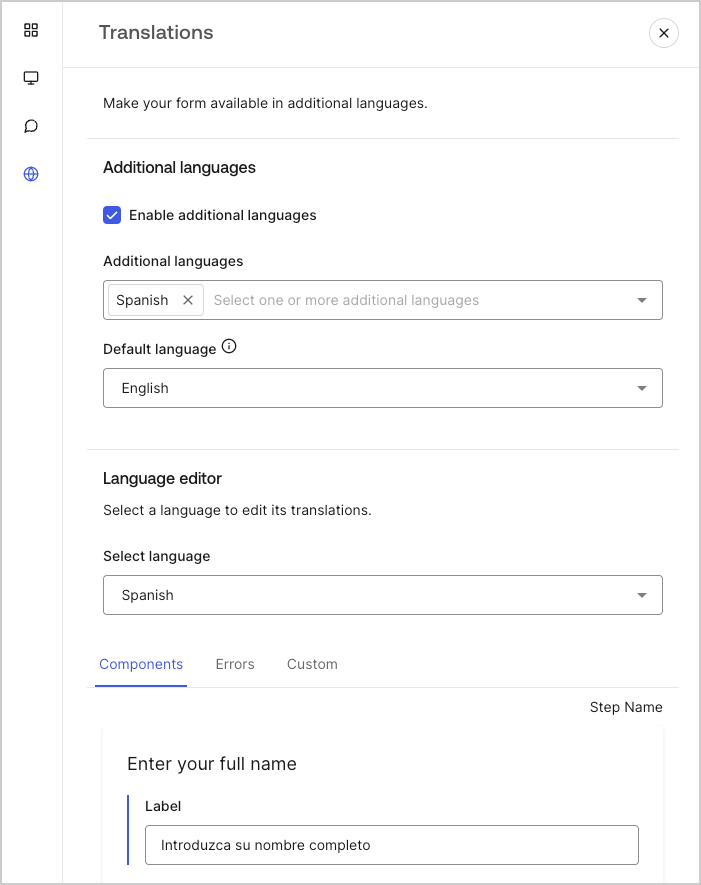
言語エディターを使用すると、フォームコンポーネント、エラー、その他のカスタムメッセージの翻訳を設定できます。

翻訳を設定するには、以下の手順に従ってください。

1. 「Select language」ドロップダウンメニューから、目的の言語を選択します。
2. 次のいずれかのタブを選択して、翻訳の設定を開始します。

   1. **Components**
   2. **Errors**
   3. **Custom**
3. 各入力可能フィールドに、必要に応じて翻訳を入力します。
4. 保存するには、**Publish** を選択します。
<Frame>
  <img src="https://mintcdn.com/docs-dev-chore-events-autoupdate/zUYE0uCEntUxkkyV/docs/images/cdy7uua7fh8z/5HY9FA6HZct2XNv5K4pCHY/c5977a7825e15285c3d77c2ca1e299a8/translation-message.png?fit=max&auto=format&n=zUYE0uCEntUxkkyV&q=85&s=d32d756beb64de6c757014effbd2b91c" alt="Dashboard > Forms > Custom messages and translations > Translation message" data-og-width="701" width="701" data-og-height="885" height="885" data-path="docs/images/cdy7uua7fh8z/5HY9FA6HZct2XNv5K4pCHY/c5977a7825e15285c3d77c2ca1e299a8/translation-message.png" data-optimize="true" data-opv="3" srcset="https://mintcdn.com/docs-dev-chore-events-autoupdate/zUYE0uCEntUxkkyV/docs/images/cdy7uua7fh8z/5HY9FA6HZct2XNv5K4pCHY/c5977a7825e15285c3d77c2ca1e299a8/translation-message.png?w=280&fit=max&auto=format&n=zUYE0uCEntUxkkyV&q=85&s=d2a8eab3fbde4b9dbfe071072d9fc8db 280w, https://mintcdn.com/docs-dev-chore-events-autoupdate/zUYE0uCEntUxkkyV/docs/images/cdy7uua7fh8z/5HY9FA6HZct2XNv5K4pCHY/c5977a7825e15285c3d77c2ca1e299a8/translation-message.png?w=560&fit=max&auto=format&n=zUYE0uCEntUxkkyV&q=85&s=d4e54ae4fc3332e04419b92c7ff80205 560w, https://mintcdn.com/docs-dev-chore-events-autoupdate/zUYE0uCEntUxkkyV/docs/images/cdy7uua7fh8z/5HY9FA6HZct2XNv5K4pCHY/c5977a7825e15285c3d77c2ca1e299a8/translation-message.png?w=840&fit=max&auto=format&n=zUYE0uCEntUxkkyV&q=85&s=1e9733f70f4053f17ee33ae365ef58bc 840w, https://mintcdn.com/docs-dev-chore-events-autoupdate/zUYE0uCEntUxkkyV/docs/images/cdy7uua7fh8z/5HY9FA6HZct2XNv5K4pCHY/c5977a7825e15285c3d77c2ca1e299a8/translation-message.png?w=1100&fit=max&auto=format&n=zUYE0uCEntUxkkyV&q=85&s=069257ffebc9cf9ca663d29517f68f08 1100w, https://mintcdn.com/docs-dev-chore-events-autoupdate/zUYE0uCEntUxkkyV/docs/images/cdy7uua7fh8z/5HY9FA6HZct2XNv5K4pCHY/c5977a7825e15285c3d77c2ca1e299a8/translation-message.png?w=1650&fit=max&auto=format&n=zUYE0uCEntUxkkyV&q=85&s=eb610db76801f2d18bcbd06a4450c95b 1650w, https://mintcdn.com/docs-dev-chore-events-autoupdate/zUYE0uCEntUxkkyV/docs/images/cdy7uua7fh8z/5HY9FA6HZct2XNv5K4pCHY/c5977a7825e15285c3d77c2ca1e299a8/translation-message.png?w=2500&fit=max&auto=format&n=zUYE0uCEntUxkkyV&q=85&s=a0583681cf3aca6dc27654516f2e96e2 2500w" />
</Frame>
