> ## Documentation Index
> Fetch the complete documentation index at: https://docs-dev-chore-events-autoupdate.mintlify.site/llms.txt
> Use this file to discover all available pages before exploring further.

> Learn how to configure your HTTP Vault Connections to authorize HTTP requests to external APIs or services.

# HTTP Vault Connection

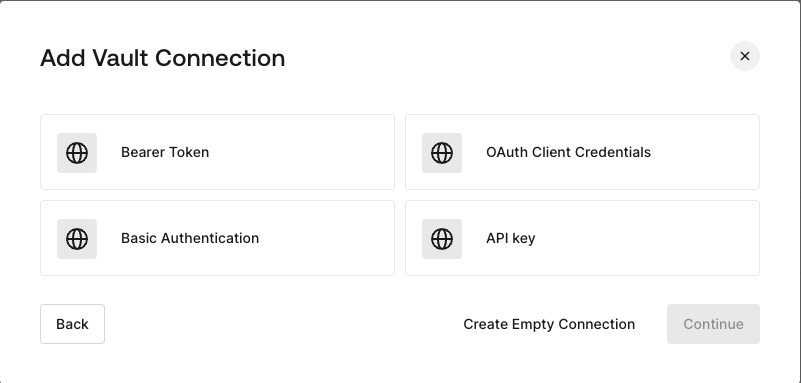
## Configure your HTTP Vault Connection Options

HTTP Vault Connection can be configure with different authentication options and then be used at your HTTP Request Flow Actions.
<Frame>
  <img src="https://mintcdn.com/docs-dev-chore-events-autoupdate/yJiEGEA8mHzl6OSC/docs/images/customize/forms/vaults/http-vault-connection-options.png?fit=max&auto=format&n=yJiEGEA8mHzl6OSC&q=85&s=70cf307873801490d65252fa73089a2a" alt="Dashboard > Actions > Forms > Vault > HTTP" data-og-width="801" width="801" data-og-height="383" height="383" data-path="docs/images/customize/forms/vaults/http-vault-connection-options.png" data-optimize="true" data-opv="3" srcset="https://mintcdn.com/docs-dev-chore-events-autoupdate/yJiEGEA8mHzl6OSC/docs/images/customize/forms/vaults/http-vault-connection-options.png?w=280&fit=max&auto=format&n=yJiEGEA8mHzl6OSC&q=85&s=b3b676bc6306ab328cc47ce2bbec5a7a 280w, https://mintcdn.com/docs-dev-chore-events-autoupdate/yJiEGEA8mHzl6OSC/docs/images/customize/forms/vaults/http-vault-connection-options.png?w=560&fit=max&auto=format&n=yJiEGEA8mHzl6OSC&q=85&s=363c9eea388a8f4155c7908b3d592a81 560w, https://mintcdn.com/docs-dev-chore-events-autoupdate/yJiEGEA8mHzl6OSC/docs/images/customize/forms/vaults/http-vault-connection-options.png?w=840&fit=max&auto=format&n=yJiEGEA8mHzl6OSC&q=85&s=0f8da60968d9a0d202e4d520b9811c77 840w, https://mintcdn.com/docs-dev-chore-events-autoupdate/yJiEGEA8mHzl6OSC/docs/images/customize/forms/vaults/http-vault-connection-options.png?w=1100&fit=max&auto=format&n=yJiEGEA8mHzl6OSC&q=85&s=4ba362789720b43ab650577dd8da0595 1100w, https://mintcdn.com/docs-dev-chore-events-autoupdate/yJiEGEA8mHzl6OSC/docs/images/customize/forms/vaults/http-vault-connection-options.png?w=1650&fit=max&auto=format&n=yJiEGEA8mHzl6OSC&q=85&s=a17d0810105f456490fc5d4e85b9cc20 1650w, https://mintcdn.com/docs-dev-chore-events-autoupdate/yJiEGEA8mHzl6OSC/docs/images/customize/forms/vaults/http-vault-connection-options.png?w=2500&fit=max&auto=format&n=yJiEGEA8mHzl6OSC&q=85&s=a4408a65f0e5aac1beee102452174dc7 2500w" />
</Frame>

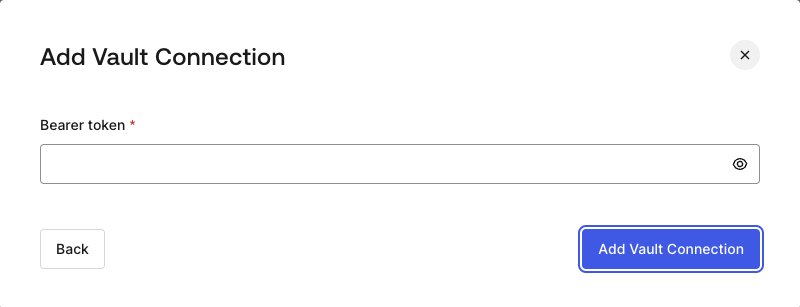
## Configure your HTTP Vault Connection for Bearer Token

To configure a HTTP Vault Connection using **Bearer Token** authorization, you need to set the required parameters.
<Frame>
  <img src="https://mintcdn.com/docs-dev-chore-events-autoupdate/yJiEGEA8mHzl6OSC/docs/images/customize/forms/vaults/http-vault-connection-bearer-token.png?fit=max&auto=format&n=yJiEGEA8mHzl6OSC&q=85&s=2965b9c5b52081739f1f372842a86c90" alt="Dashboard > Actions > Forms > Vault > HTTP" data-og-width="800" width="800" data-og-height="307" height="307" data-path="docs/images/customize/forms/vaults/http-vault-connection-bearer-token.png" data-optimize="true" data-opv="3" srcset="https://mintcdn.com/docs-dev-chore-events-autoupdate/yJiEGEA8mHzl6OSC/docs/images/customize/forms/vaults/http-vault-connection-bearer-token.png?w=280&fit=max&auto=format&n=yJiEGEA8mHzl6OSC&q=85&s=80b69c01311098414d2a981d0b4b189e 280w, https://mintcdn.com/docs-dev-chore-events-autoupdate/yJiEGEA8mHzl6OSC/docs/images/customize/forms/vaults/http-vault-connection-bearer-token.png?w=560&fit=max&auto=format&n=yJiEGEA8mHzl6OSC&q=85&s=fac7a1af7e1fd5259961b6a27f519fb3 560w, https://mintcdn.com/docs-dev-chore-events-autoupdate/yJiEGEA8mHzl6OSC/docs/images/customize/forms/vaults/http-vault-connection-bearer-token.png?w=840&fit=max&auto=format&n=yJiEGEA8mHzl6OSC&q=85&s=e83c32280281a57f6112c0f1e083a249 840w, https://mintcdn.com/docs-dev-chore-events-autoupdate/yJiEGEA8mHzl6OSC/docs/images/customize/forms/vaults/http-vault-connection-bearer-token.png?w=1100&fit=max&auto=format&n=yJiEGEA8mHzl6OSC&q=85&s=4e5e0e41f20d8e81c5b4acd1e04499eb 1100w, https://mintcdn.com/docs-dev-chore-events-autoupdate/yJiEGEA8mHzl6OSC/docs/images/customize/forms/vaults/http-vault-connection-bearer-token.png?w=1650&fit=max&auto=format&n=yJiEGEA8mHzl6OSC&q=85&s=d2000680ddb90259a60b101a7b53f56c 1650w, https://mintcdn.com/docs-dev-chore-events-autoupdate/yJiEGEA8mHzl6OSC/docs/images/customize/forms/vaults/http-vault-connection-bearer-token.png?w=2500&fit=max&auto=format&n=yJiEGEA8mHzl6OSC&q=85&s=5a60a616b1cd7e3d326d55dba7095895 2500w" />
</Frame>

### Input settings

| Parameter | Description |
| - | - |
| Bearer Token | Static token used for external service authorization. |

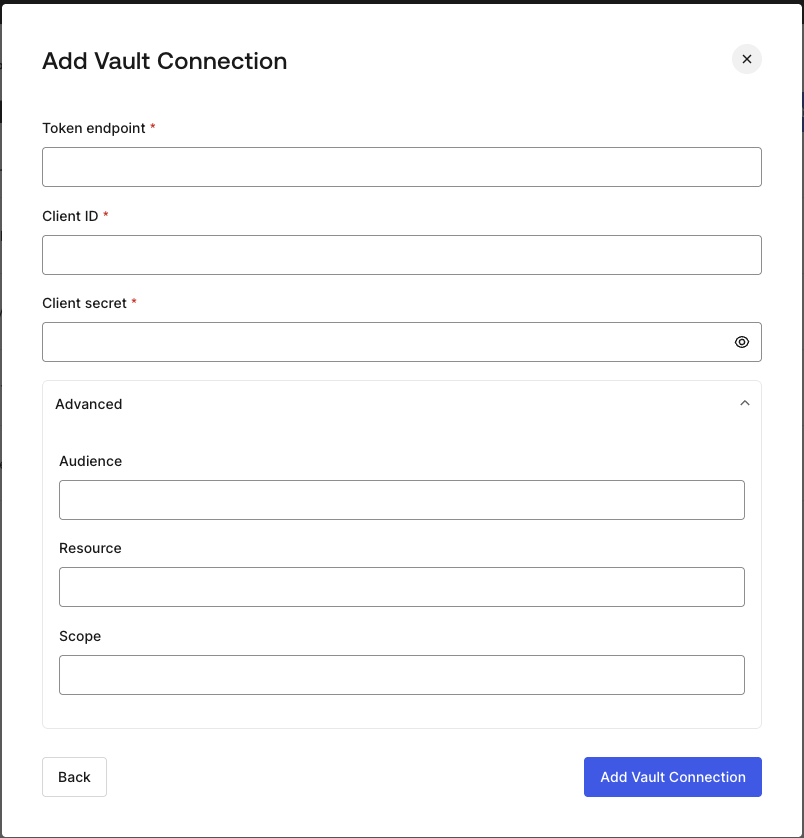
## Configure your HTTP Vault Connection for OAuth Client Credentials

To configure a HTTP Vault Connection using **Client Credentials** authorization, you need to set the required parameters.
<Frame>
  <img src="https://mintcdn.com/docs-dev-chore-events-autoupdate/yJiEGEA8mHzl6OSC/docs/images/customize/forms/vaults/http-vault-connection-oauth-client-credentials.png?fit=max&auto=format&n=yJiEGEA8mHzl6OSC&q=85&s=236f7c1f791cf1476582e7c4807dd9a4" alt="Dashboard > Actions > Forms > Vault > HTTP " data-og-width="804" width="804" data-og-height="838" height="838" data-path="docs/images/customize/forms/vaults/http-vault-connection-oauth-client-credentials.png" data-optimize="true" data-opv="3" srcset="https://mintcdn.com/docs-dev-chore-events-autoupdate/yJiEGEA8mHzl6OSC/docs/images/customize/forms/vaults/http-vault-connection-oauth-client-credentials.png?w=280&fit=max&auto=format&n=yJiEGEA8mHzl6OSC&q=85&s=87f85523e89786912eed4a45cd6eb8a6 280w, https://mintcdn.com/docs-dev-chore-events-autoupdate/yJiEGEA8mHzl6OSC/docs/images/customize/forms/vaults/http-vault-connection-oauth-client-credentials.png?w=560&fit=max&auto=format&n=yJiEGEA8mHzl6OSC&q=85&s=cf5f8e0e3b94536d775bdafefa0e9cfd 560w, https://mintcdn.com/docs-dev-chore-events-autoupdate/yJiEGEA8mHzl6OSC/docs/images/customize/forms/vaults/http-vault-connection-oauth-client-credentials.png?w=840&fit=max&auto=format&n=yJiEGEA8mHzl6OSC&q=85&s=0437fe4ac70cae2132f8bb2dde341a6f 840w, https://mintcdn.com/docs-dev-chore-events-autoupdate/yJiEGEA8mHzl6OSC/docs/images/customize/forms/vaults/http-vault-connection-oauth-client-credentials.png?w=1100&fit=max&auto=format&n=yJiEGEA8mHzl6OSC&q=85&s=f9cea74b4b1ca7e945a5c9839f29646b 1100w, https://mintcdn.com/docs-dev-chore-events-autoupdate/yJiEGEA8mHzl6OSC/docs/images/customize/forms/vaults/http-vault-connection-oauth-client-credentials.png?w=1650&fit=max&auto=format&n=yJiEGEA8mHzl6OSC&q=85&s=ddfa64846f605f57b2a92a2b6f363f5b 1650w, https://mintcdn.com/docs-dev-chore-events-autoupdate/yJiEGEA8mHzl6OSC/docs/images/customize/forms/vaults/http-vault-connection-oauth-client-credentials.png?w=2500&fit=max&auto=format&n=yJiEGEA8mHzl6OSC&q=85&s=6977c004a19b806c4af4cac8564408f2 2500w" />
</Frame>

### Input settings

| Parameter | Description |
| - | - |
| Tenant Endpoint | Tenant Endpoint of the Authorization Server issuing the Access Tokens. |
| Client ID | Client ID of your M2M Application authorized for Custom API. |
| Client Secret | Client Secret of your M2M Application authorized for Custom API. |
| Audience (Optional) | Custom API Audience. Normally used for Custom APIs defined in Auth0. |
| Resource (Optional) | Custom API Resource. Standard parameter with similar meaning of Audience. |
| Scope (Optional) | Scope list in string format separated by spaces. |

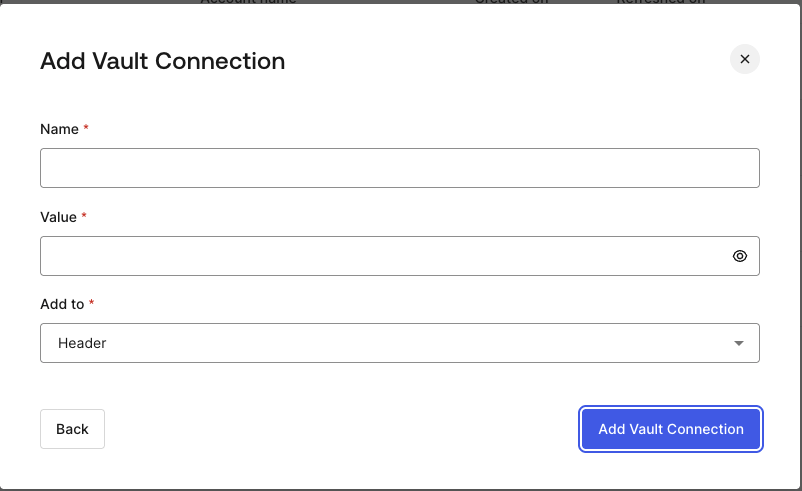
## Configure your HTTP Vault Connection for API Key

To configure a HTTP Vault Connection using **API Key** authorization, you need to set the required parameters.
<Frame>
  <img src="https://mintcdn.com/docs-dev-chore-events-autoupdate/yJiEGEA8mHzl6OSC/docs/images/customize/forms/vaults/http-vault-connection-api-key.png?fit=max&auto=format&n=yJiEGEA8mHzl6OSC&q=85&s=561852fb2716ee5878c8106ff83b191b" alt="Dashboard > Actions > Forms > Vault > HTTP " data-og-width="802" width="802" data-og-height="491" height="491" data-path="docs/images/customize/forms/vaults/http-vault-connection-api-key.png" data-optimize="true" data-opv="3" srcset="https://mintcdn.com/docs-dev-chore-events-autoupdate/yJiEGEA8mHzl6OSC/docs/images/customize/forms/vaults/http-vault-connection-api-key.png?w=280&fit=max&auto=format&n=yJiEGEA8mHzl6OSC&q=85&s=1dddffb053263149fdbf918749aa7238 280w, https://mintcdn.com/docs-dev-chore-events-autoupdate/yJiEGEA8mHzl6OSC/docs/images/customize/forms/vaults/http-vault-connection-api-key.png?w=560&fit=max&auto=format&n=yJiEGEA8mHzl6OSC&q=85&s=d65bbed9456b9fa34aff797d284cb8e7 560w, https://mintcdn.com/docs-dev-chore-events-autoupdate/yJiEGEA8mHzl6OSC/docs/images/customize/forms/vaults/http-vault-connection-api-key.png?w=840&fit=max&auto=format&n=yJiEGEA8mHzl6OSC&q=85&s=33183d0acda8c37d2bfc8d5c22c3b800 840w, https://mintcdn.com/docs-dev-chore-events-autoupdate/yJiEGEA8mHzl6OSC/docs/images/customize/forms/vaults/http-vault-connection-api-key.png?w=1100&fit=max&auto=format&n=yJiEGEA8mHzl6OSC&q=85&s=898869ba65f03ea7089e7dcbc6eaf7ae 1100w, https://mintcdn.com/docs-dev-chore-events-autoupdate/yJiEGEA8mHzl6OSC/docs/images/customize/forms/vaults/http-vault-connection-api-key.png?w=1650&fit=max&auto=format&n=yJiEGEA8mHzl6OSC&q=85&s=bd51da4dc1421e9bc30997eba29a5c9b 1650w, https://mintcdn.com/docs-dev-chore-events-autoupdate/yJiEGEA8mHzl6OSC/docs/images/customize/forms/vaults/http-vault-connection-api-key.png?w=2500&fit=max&auto=format&n=yJiEGEA8mHzl6OSC&q=85&s=a924b94fa3be48977ca6603c36f59eb8 2500w" />
</Frame>

### Input settings

| Parameter | Description |
| - | - |
| Name | API Key name to be added as Header or Query parameter. |
| Value | API Key value to be added as Header or Query parameter. |
| Add To | By default, it's Header. Determines whether to add the API Key as Header or Query parameter. |

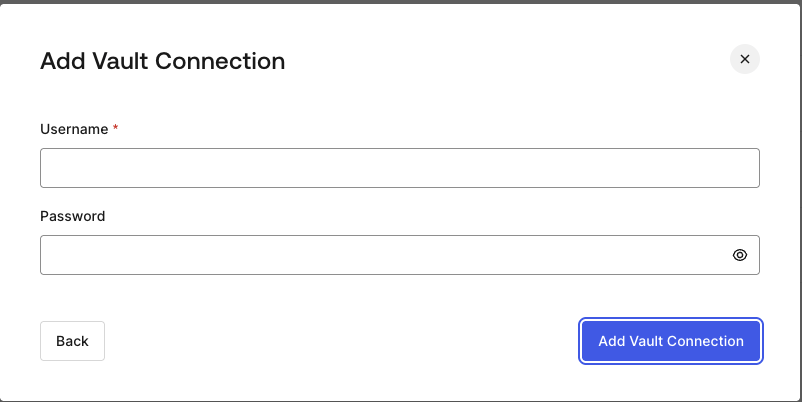
## Configure your HTTP Vault Connection for Basic Authentication

To configure a HTTP Vault Connection using **Basic Auth** authorization, you need to set the required parameters.
<Frame>
  <img src="https://mintcdn.com/docs-dev-chore-events-autoupdate/yJiEGEA8mHzl6OSC/docs/images/customize/forms/vaults/http-vault-connection-basic-authentication.png?fit=max&auto=format&n=yJiEGEA8mHzl6OSC&q=85&s=b31247ba25032ae163d7c406686aeb8f" alt="Dashboard > Actions > Forms > Vault > HTTP " data-og-width="802" width="802" data-og-height="402" height="402" data-path="docs/images/customize/forms/vaults/http-vault-connection-basic-authentication.png" data-optimize="true" data-opv="3" srcset="https://mintcdn.com/docs-dev-chore-events-autoupdate/yJiEGEA8mHzl6OSC/docs/images/customize/forms/vaults/http-vault-connection-basic-authentication.png?w=280&fit=max&auto=format&n=yJiEGEA8mHzl6OSC&q=85&s=a958282851fa966e0f879f6489fcaea1 280w, https://mintcdn.com/docs-dev-chore-events-autoupdate/yJiEGEA8mHzl6OSC/docs/images/customize/forms/vaults/http-vault-connection-basic-authentication.png?w=560&fit=max&auto=format&n=yJiEGEA8mHzl6OSC&q=85&s=724d3565d2a20ff02180744c0365c1e5 560w, https://mintcdn.com/docs-dev-chore-events-autoupdate/yJiEGEA8mHzl6OSC/docs/images/customize/forms/vaults/http-vault-connection-basic-authentication.png?w=840&fit=max&auto=format&n=yJiEGEA8mHzl6OSC&q=85&s=d504e4f6f8ac072d4bb06b05dd4c8135 840w, https://mintcdn.com/docs-dev-chore-events-autoupdate/yJiEGEA8mHzl6OSC/docs/images/customize/forms/vaults/http-vault-connection-basic-authentication.png?w=1100&fit=max&auto=format&n=yJiEGEA8mHzl6OSC&q=85&s=4df849965ff2543b02736a532ff67f6e 1100w, https://mintcdn.com/docs-dev-chore-events-autoupdate/yJiEGEA8mHzl6OSC/docs/images/customize/forms/vaults/http-vault-connection-basic-authentication.png?w=1650&fit=max&auto=format&n=yJiEGEA8mHzl6OSC&q=85&s=d99b71e5db3d2e0e33ebc79b4e53f766 1650w, https://mintcdn.com/docs-dev-chore-events-autoupdate/yJiEGEA8mHzl6OSC/docs/images/customize/forms/vaults/http-vault-connection-basic-authentication.png?w=2500&fit=max&auto=format&n=yJiEGEA8mHzl6OSC&q=85&s=77b2efa2893e2c129860d37963c15867 2500w" />
</Frame>

### Input settings

| Parameter | Description |
| - | - |
| Username | Username to be concatenated and base64 encoded, then added as Basic Authorization Header parameter. |
| Password | Password to be concatenated and base64 encoded, then added as Basic Authorization Header parameter. |

<Warning>
  HTTP Vault Connection with Basic Auth configuration, is looking forward to replace the currently built-in option at Flows HTTP Request Action.
</Warning>
