> ## Documentation Index
> Fetch the complete documentation index at: https://docs-dev-chore-events-autoupdate.mintlify.site/llms.txt
> Use this file to discover all available pages before exploring further.

> Learn how to configure an update policy form using Forms for Actions for users to review and accept new terms of service or consent updates.

# Use Cases: Configure an update policy form using Forms

<Card title="Before you start">
  1. Create a [Machine-to-Machine Application](/docs/get-started/auth0-overview/create-applications/machine-to-machine-apps) with the following scopes enabled:

  * `read:users`
  * `update:users`
  * `create:users`
  * `read:users_app_metadata`
  * `update:users_app_metadata`
  * `create:users_app_metadata`

  2. Add a [Vault connection](/docs/customize/forms/vault) using the M2M application credentials.
</Card>

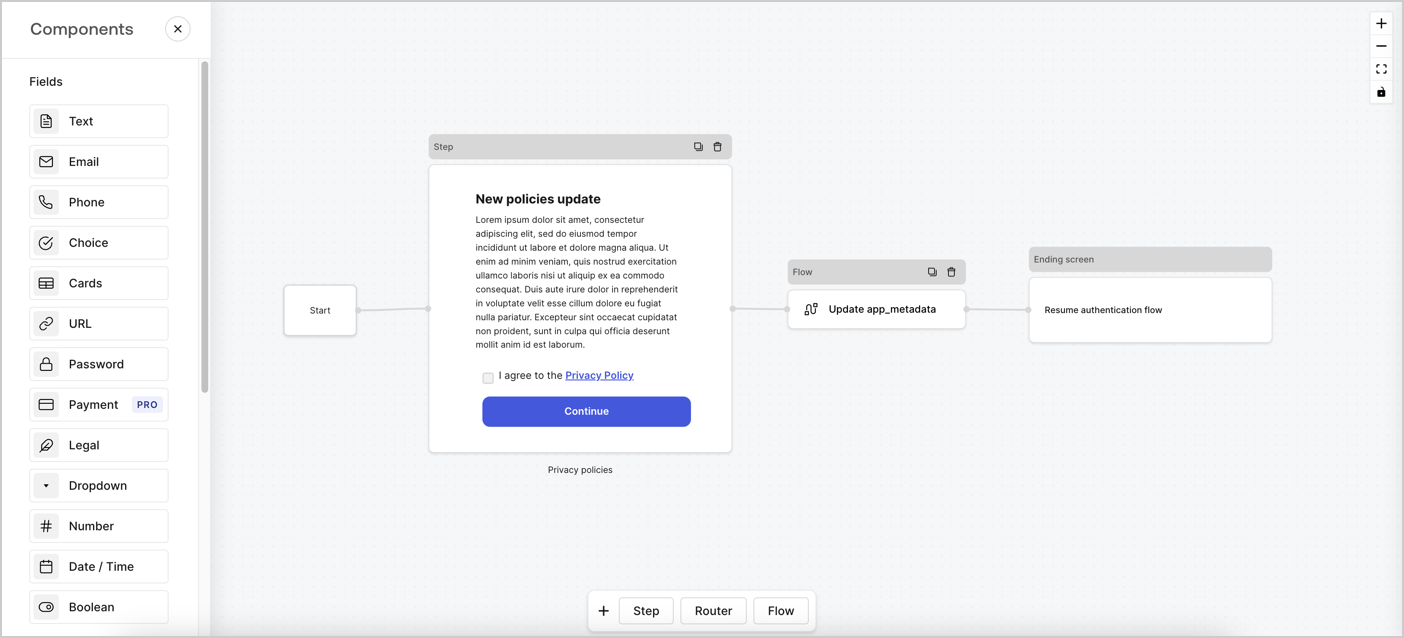
Forms for Actions allows you to create custom privacy policies flows and store the consent under the `app_metadata` object.
<Frame>
  <img src="https://mintcdn.com/docs-dev-chore-events-autoupdate/JrqAYUIkepsXuxEr/docs/images/cdy7uua7fh8z/6i68dMvHDTijfRmSgN1x8Q/ad900e7d4c0fb34645921435472b8684/privavy-policy-form.png?fit=max&auto=format&n=JrqAYUIkepsXuxEr&q=85&s=bd3f5988725a251e4b97851afff38966" alt="Dashboard > Actions > Forms > Privacy policy use case" data-og-width="1404" width="1404" data-og-height="638" height="638" data-path="docs/images/cdy7uua7fh8z/6i68dMvHDTijfRmSgN1x8Q/ad900e7d4c0fb34645921435472b8684/privavy-policy-form.png" data-optimize="true" data-opv="3" srcset="https://mintcdn.com/docs-dev-chore-events-autoupdate/JrqAYUIkepsXuxEr/docs/images/cdy7uua7fh8z/6i68dMvHDTijfRmSgN1x8Q/ad900e7d4c0fb34645921435472b8684/privavy-policy-form.png?w=280&fit=max&auto=format&n=JrqAYUIkepsXuxEr&q=85&s=ec8c521db17bac515d0242c0fdfc71ad 280w, https://mintcdn.com/docs-dev-chore-events-autoupdate/JrqAYUIkepsXuxEr/docs/images/cdy7uua7fh8z/6i68dMvHDTijfRmSgN1x8Q/ad900e7d4c0fb34645921435472b8684/privavy-policy-form.png?w=560&fit=max&auto=format&n=JrqAYUIkepsXuxEr&q=85&s=49fea054c3b51c01b8dc2f8d1d2196a2 560w, https://mintcdn.com/docs-dev-chore-events-autoupdate/JrqAYUIkepsXuxEr/docs/images/cdy7uua7fh8z/6i68dMvHDTijfRmSgN1x8Q/ad900e7d4c0fb34645921435472b8684/privavy-policy-form.png?w=840&fit=max&auto=format&n=JrqAYUIkepsXuxEr&q=85&s=2283ee941ac7a3334192fae165660b2f 840w, https://mintcdn.com/docs-dev-chore-events-autoupdate/JrqAYUIkepsXuxEr/docs/images/cdy7uua7fh8z/6i68dMvHDTijfRmSgN1x8Q/ad900e7d4c0fb34645921435472b8684/privavy-policy-form.png?w=1100&fit=max&auto=format&n=JrqAYUIkepsXuxEr&q=85&s=0233dc071e9965597582fe559291a02e 1100w, https://mintcdn.com/docs-dev-chore-events-autoupdate/JrqAYUIkepsXuxEr/docs/images/cdy7uua7fh8z/6i68dMvHDTijfRmSgN1x8Q/ad900e7d4c0fb34645921435472b8684/privavy-policy-form.png?w=1650&fit=max&auto=format&n=JrqAYUIkepsXuxEr&q=85&s=a132b0988847bc97690f0c358e703efe 1650w, https://mintcdn.com/docs-dev-chore-events-autoupdate/JrqAYUIkepsXuxEr/docs/images/cdy7uua7fh8z/6i68dMvHDTijfRmSgN1x8Q/ad900e7d4c0fb34645921435472b8684/privavy-policy-form.png?w=2500&fit=max&auto=format&n=JrqAYUIkepsXuxEr&q=85&s=885b493273271fce9298103534ab2fcd 2500w" />
</Frame>

The sections below outline how you can create an Update Policy form using nodes and flows, along with steps for adding your form to a [Post Login](/docs/customize/actions/explore-triggers/signup-and-login-triggers/login-trigger) Action.

## Create a form from scratch

Follow these steps to create a form to gather information:

1. Open the Form editor by selecting **Auth0 Dashboard > Actions > Forms.**
2. Select **Create Form** > **Start from scratch**.

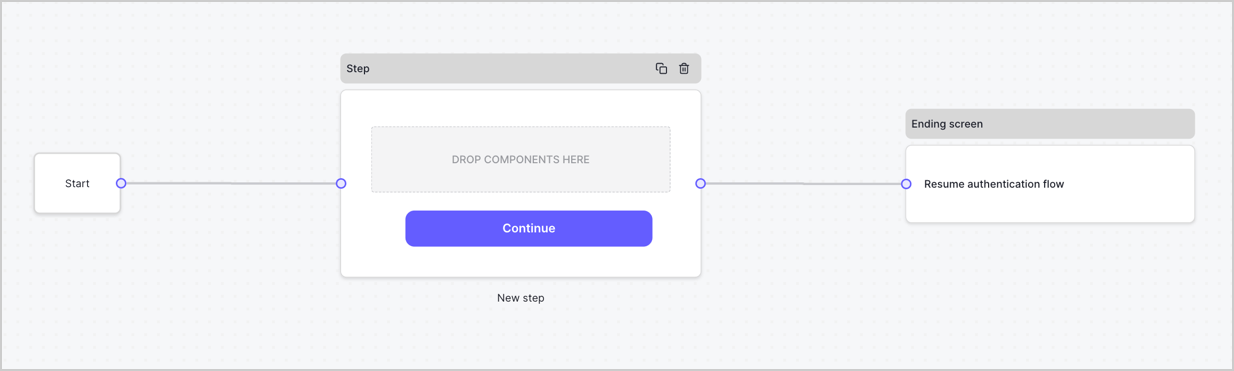
By default, a new form contains a Start node, a Step node, and an Ending screen node.
<Frame>
  <img src="https://mintcdn.com/docs-dev-chore-events-autoupdate/C-wLBWI5GtiUYTuO/docs/images/cdy7uua7fh8z/2TZ9jSjgEcARFpULI6hz4R/a4319a1bd482f2ee5cc23100fdb2f42c/New-form-Forms-for-action-use-case.png?fit=max&auto=format&n=C-wLBWI5GtiUYTuO&q=85&s=7d165a121e5a9bfef38c82b09a03f921" alt="Dashboard > Forms > Use Cases > Form" data-og-width="1234" width="1234" data-og-height="371" height="371" data-path="docs/images/cdy7uua7fh8z/2TZ9jSjgEcARFpULI6hz4R/a4319a1bd482f2ee5cc23100fdb2f42c/New-form-Forms-for-action-use-case.png" data-optimize="true" data-opv="3" srcset="https://mintcdn.com/docs-dev-chore-events-autoupdate/C-wLBWI5GtiUYTuO/docs/images/cdy7uua7fh8z/2TZ9jSjgEcARFpULI6hz4R/a4319a1bd482f2ee5cc23100fdb2f42c/New-form-Forms-for-action-use-case.png?w=280&fit=max&auto=format&n=C-wLBWI5GtiUYTuO&q=85&s=ad76673528e9cc61b95ce95756131035 280w, https://mintcdn.com/docs-dev-chore-events-autoupdate/C-wLBWI5GtiUYTuO/docs/images/cdy7uua7fh8z/2TZ9jSjgEcARFpULI6hz4R/a4319a1bd482f2ee5cc23100fdb2f42c/New-form-Forms-for-action-use-case.png?w=560&fit=max&auto=format&n=C-wLBWI5GtiUYTuO&q=85&s=f7eea182328fc615bd0b043c52919a7d 560w, https://mintcdn.com/docs-dev-chore-events-autoupdate/C-wLBWI5GtiUYTuO/docs/images/cdy7uua7fh8z/2TZ9jSjgEcARFpULI6hz4R/a4319a1bd482f2ee5cc23100fdb2f42c/New-form-Forms-for-action-use-case.png?w=840&fit=max&auto=format&n=C-wLBWI5GtiUYTuO&q=85&s=947f0c433c27a08a8aac370a9872922e 840w, https://mintcdn.com/docs-dev-chore-events-autoupdate/C-wLBWI5GtiUYTuO/docs/images/cdy7uua7fh8z/2TZ9jSjgEcARFpULI6hz4R/a4319a1bd482f2ee5cc23100fdb2f42c/New-form-Forms-for-action-use-case.png?w=1100&fit=max&auto=format&n=C-wLBWI5GtiUYTuO&q=85&s=310cdf70cc88507bcbb9b7ac23ea226a 1100w, https://mintcdn.com/docs-dev-chore-events-autoupdate/C-wLBWI5GtiUYTuO/docs/images/cdy7uua7fh8z/2TZ9jSjgEcARFpULI6hz4R/a4319a1bd482f2ee5cc23100fdb2f42c/New-form-Forms-for-action-use-case.png?w=1650&fit=max&auto=format&n=C-wLBWI5GtiUYTuO&q=85&s=43f4c5631e2b1e1b267bdfcaa40d6fc0 1650w, https://mintcdn.com/docs-dev-chore-events-autoupdate/C-wLBWI5GtiUYTuO/docs/images/cdy7uua7fh8z/2TZ9jSjgEcARFpULI6hz4R/a4319a1bd482f2ee5cc23100fdb2f42c/New-form-Forms-for-action-use-case.png?w=2500&fit=max&auto=format&n=C-wLBWI5GtiUYTuO&q=85&s=94f2d7c60e4678ccd548eb1527a2c887 2500w" />
</Frame>

### Configure the Step node

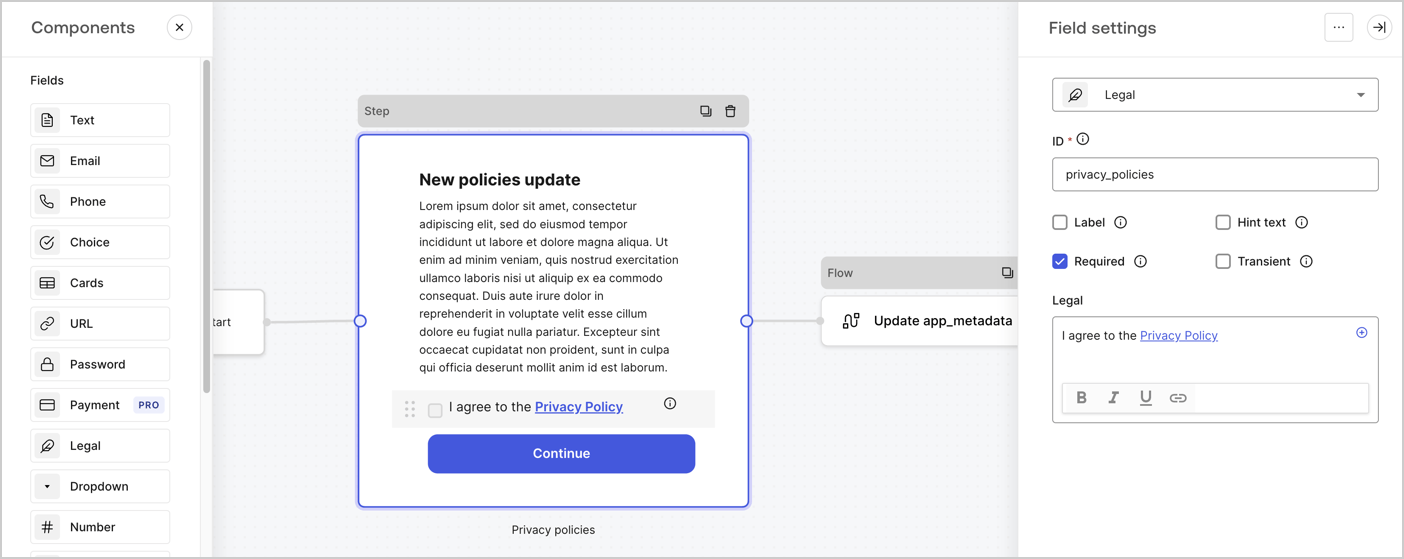
The Step node is the graphical interface visible to users. Add [Fields](/docs/customize/forms/nodes-and-components) to the Step node to collect the new agreement acceptance value by following these steps:

1. Drag a **Rich text** field from the **Components menu** into the **Step** node.

   * **Rich text**: Enter a description of your privacy policies updates.
   * Select **Save**.
2. Drag a **Legal** field into the **Step** node.

   * **ID**: Enter `privacy_policies`.
   * **Required**: Enable the checkbox.
   * **Legal**: Enter `I agree to the Privacy Policy`.
   * Select **Save**.
3. Select **Publish** to save.
<Frame>
  <img src="https://mintcdn.com/docs-dev-chore-events-autoupdate/zUYE0uCEntUxkkyV/docs/images/cdy7uua7fh8z/59zFFjQjAnjogkc2QGIqqJ/0ad66b1b636544122aa4e65968b76c2c/privacy-policy-step-node.png?fit=max&auto=format&n=zUYE0uCEntUxkkyV&q=85&s=25eac5b614a1fe8b493008a6de418ab8" alt="Dashboard > Actions > Forms > Use case privacy policy step node" data-og-width="1404" width="1404" data-og-height="559" height="559" data-path="docs/images/cdy7uua7fh8z/59zFFjQjAnjogkc2QGIqqJ/0ad66b1b636544122aa4e65968b76c2c/privacy-policy-step-node.png" data-optimize="true" data-opv="3" srcset="https://mintcdn.com/docs-dev-chore-events-autoupdate/zUYE0uCEntUxkkyV/docs/images/cdy7uua7fh8z/59zFFjQjAnjogkc2QGIqqJ/0ad66b1b636544122aa4e65968b76c2c/privacy-policy-step-node.png?w=280&fit=max&auto=format&n=zUYE0uCEntUxkkyV&q=85&s=19306b502a38596184f7eb99d8d61a79 280w, https://mintcdn.com/docs-dev-chore-events-autoupdate/zUYE0uCEntUxkkyV/docs/images/cdy7uua7fh8z/59zFFjQjAnjogkc2QGIqqJ/0ad66b1b636544122aa4e65968b76c2c/privacy-policy-step-node.png?w=560&fit=max&auto=format&n=zUYE0uCEntUxkkyV&q=85&s=31243bf5827b922c2f9693a9fcbf9f85 560w, https://mintcdn.com/docs-dev-chore-events-autoupdate/zUYE0uCEntUxkkyV/docs/images/cdy7uua7fh8z/59zFFjQjAnjogkc2QGIqqJ/0ad66b1b636544122aa4e65968b76c2c/privacy-policy-step-node.png?w=840&fit=max&auto=format&n=zUYE0uCEntUxkkyV&q=85&s=76b488f2cfe3be0d5f61f691d9a0e4bf 840w, https://mintcdn.com/docs-dev-chore-events-autoupdate/zUYE0uCEntUxkkyV/docs/images/cdy7uua7fh8z/59zFFjQjAnjogkc2QGIqqJ/0ad66b1b636544122aa4e65968b76c2c/privacy-policy-step-node.png?w=1100&fit=max&auto=format&n=zUYE0uCEntUxkkyV&q=85&s=33837d03bea406c02b97a8a722b3a34a 1100w, https://mintcdn.com/docs-dev-chore-events-autoupdate/zUYE0uCEntUxkkyV/docs/images/cdy7uua7fh8z/59zFFjQjAnjogkc2QGIqqJ/0ad66b1b636544122aa4e65968b76c2c/privacy-policy-step-node.png?w=1650&fit=max&auto=format&n=zUYE0uCEntUxkkyV&q=85&s=02df382065a09e9570b9cbffd8c0a14f 1650w, https://mintcdn.com/docs-dev-chore-events-autoupdate/zUYE0uCEntUxkkyV/docs/images/cdy7uua7fh8z/59zFFjQjAnjogkc2QGIqqJ/0ad66b1b636544122aa4e65968b76c2c/privacy-policy-step-node.png?w=2500&fit=max&auto=format&n=zUYE0uCEntUxkkyV&q=85&s=2482fbd4737628c422383f8fedd29229 2500w" />
</Frame>

### Configure the Flow node

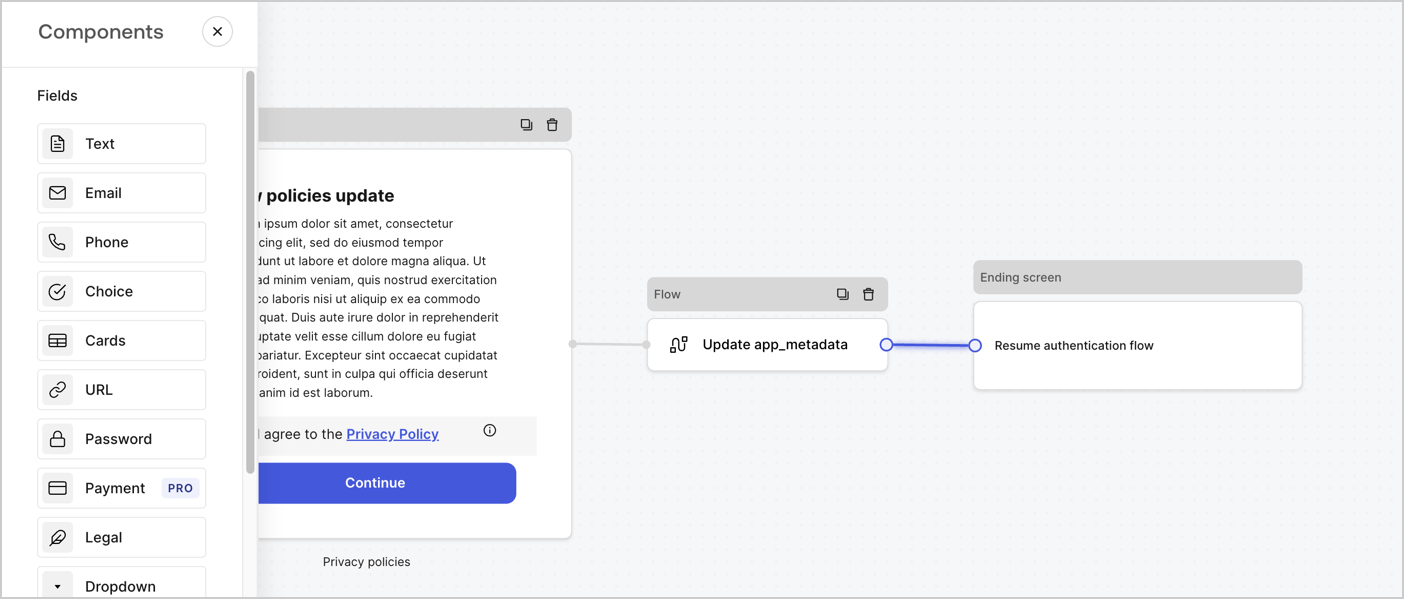
Add a **Flow** node after the **Step** node to update the `app_metadata` and resume the authentication flow by following these steps:

1. Select **Flow** from the bottom of the Form editor.
2. Remove the existing link between the **Step** and **Ending Screen** nodes.
3. Select the new **Flow** > **Click to add a flow** > **Create a new flow.**

   * Enter `Update app_metadata` in the **Name** field.
   * Select **Create**.
   * Select **Save**.
4. Link the **Flow** node to the **Step** and **Ending Screen** nodes as pictured below.
5. Select **Publish** to save.
<Frame>
  <img src="https://mintcdn.com/docs-dev-chore-events-autoupdate/JrqAYUIkepsXuxEr/docs/images/cdy7uua7fh8z/6YIkzm7SrpM9LW76AXuRzh/353c518fe82bbaa440836da1d83596d6/link-policies.png?fit=max&auto=format&n=JrqAYUIkepsXuxEr&q=85&s=639f5c5dd01f2f30a4eb3e5ceae786a6" alt="Dashboard > Actions > Forms > Form" data-og-width="1404" width="1404" data-og-height="599" height="599" data-path="docs/images/cdy7uua7fh8z/6YIkzm7SrpM9LW76AXuRzh/353c518fe82bbaa440836da1d83596d6/link-policies.png" data-optimize="true" data-opv="3" srcset="https://mintcdn.com/docs-dev-chore-events-autoupdate/JrqAYUIkepsXuxEr/docs/images/cdy7uua7fh8z/6YIkzm7SrpM9LW76AXuRzh/353c518fe82bbaa440836da1d83596d6/link-policies.png?w=280&fit=max&auto=format&n=JrqAYUIkepsXuxEr&q=85&s=862823164a97f29f6833d25f44dc601e 280w, https://mintcdn.com/docs-dev-chore-events-autoupdate/JrqAYUIkepsXuxEr/docs/images/cdy7uua7fh8z/6YIkzm7SrpM9LW76AXuRzh/353c518fe82bbaa440836da1d83596d6/link-policies.png?w=560&fit=max&auto=format&n=JrqAYUIkepsXuxEr&q=85&s=25749f9048ede7c9e9a7682ba2988ece 560w, https://mintcdn.com/docs-dev-chore-events-autoupdate/JrqAYUIkepsXuxEr/docs/images/cdy7uua7fh8z/6YIkzm7SrpM9LW76AXuRzh/353c518fe82bbaa440836da1d83596d6/link-policies.png?w=840&fit=max&auto=format&n=JrqAYUIkepsXuxEr&q=85&s=44228878c4636021489e062a34b25d85 840w, https://mintcdn.com/docs-dev-chore-events-autoupdate/JrqAYUIkepsXuxEr/docs/images/cdy7uua7fh8z/6YIkzm7SrpM9LW76AXuRzh/353c518fe82bbaa440836da1d83596d6/link-policies.png?w=1100&fit=max&auto=format&n=JrqAYUIkepsXuxEr&q=85&s=265855431fd3479c142356d1f0160b16 1100w, https://mintcdn.com/docs-dev-chore-events-autoupdate/JrqAYUIkepsXuxEr/docs/images/cdy7uua7fh8z/6YIkzm7SrpM9LW76AXuRzh/353c518fe82bbaa440836da1d83596d6/link-policies.png?w=1650&fit=max&auto=format&n=JrqAYUIkepsXuxEr&q=85&s=8af6e7ca52a2c1935c9693316233a611 1650w, https://mintcdn.com/docs-dev-chore-events-autoupdate/JrqAYUIkepsXuxEr/docs/images/cdy7uua7fh8z/6YIkzm7SrpM9LW76AXuRzh/353c518fe82bbaa440836da1d83596d6/link-policies.png?w=2500&fit=max&auto=format&n=JrqAYUIkepsXuxEr&q=85&s=feb340382d78b3391578a844b2fe44a1 2500w" />
</Frame>

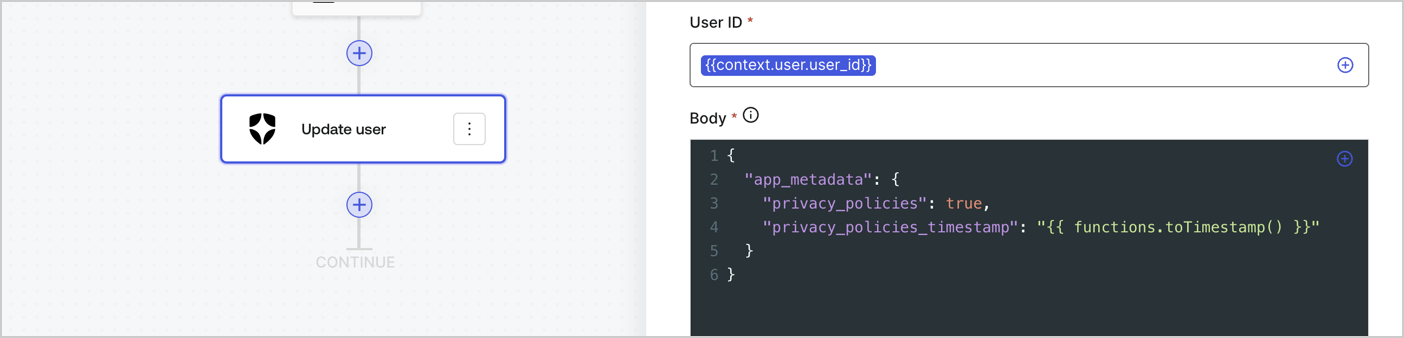
Add an Auth0 Update user action to the flow by following these steps:

1. Select the **Flow** **Update app\_metadata** > **Edit flow** to open the Flow editor in a new tab.
2. Below the StartAction, select the **+** icon to add an **Update user** action. Complete the fields below, then select **Save** to continue.

   * **Connection**: Select from the dropdown the Vault connection to your M2M application.

   * **User ID**: Enter `{{context.user.user_id}}`.

   * **Body**: Copy and paste the following code to update the app\_metadata with the privacy\_policies and privacy\_policies\_timestamp properties.

     ```text lines theme={null}
     {
       "app_metadata": {
         "privacy_policies": true,
         "privacy_policies_timestamp": "{{ functions.toTimestamp() }}"
       }
     }
     ```

   * Select **Save**.
3. Select **Publish** to save.
<Frame>
  <img src="https://mintcdn.com/docs-dev-chore-events-autoupdate/Qs5ZwHnLtsQCywJ0/docs/images/cdy7uua7fh8z/CvMNIwWrOUwaFW4X3G28p/1fb70ae57a20749d9ffaaba8dc0b7e26/update-user-privacy.png?fit=max&auto=format&n=Qs5ZwHnLtsQCywJ0&q=85&s=82b9d40371bf01d5f18b13df8f5810ca" alt="Dashboard > Actions > Forms > User case privacy policy code" data-og-width="1404" width="1404" data-og-height="338" height="338" data-path="docs/images/cdy7uua7fh8z/CvMNIwWrOUwaFW4X3G28p/1fb70ae57a20749d9ffaaba8dc0b7e26/update-user-privacy.png" data-optimize="true" data-opv="3" srcset="https://mintcdn.com/docs-dev-chore-events-autoupdate/Qs5ZwHnLtsQCywJ0/docs/images/cdy7uua7fh8z/CvMNIwWrOUwaFW4X3G28p/1fb70ae57a20749d9ffaaba8dc0b7e26/update-user-privacy.png?w=280&fit=max&auto=format&n=Qs5ZwHnLtsQCywJ0&q=85&s=8307d480ec34cfd8e63ea722774aec54 280w, https://mintcdn.com/docs-dev-chore-events-autoupdate/Qs5ZwHnLtsQCywJ0/docs/images/cdy7uua7fh8z/CvMNIwWrOUwaFW4X3G28p/1fb70ae57a20749d9ffaaba8dc0b7e26/update-user-privacy.png?w=560&fit=max&auto=format&n=Qs5ZwHnLtsQCywJ0&q=85&s=2f938999c297924c907ac4a2e1890f4b 560w, https://mintcdn.com/docs-dev-chore-events-autoupdate/Qs5ZwHnLtsQCywJ0/docs/images/cdy7uua7fh8z/CvMNIwWrOUwaFW4X3G28p/1fb70ae57a20749d9ffaaba8dc0b7e26/update-user-privacy.png?w=840&fit=max&auto=format&n=Qs5ZwHnLtsQCywJ0&q=85&s=ef1dab8e0a266a2cbdc17f3501df6451 840w, https://mintcdn.com/docs-dev-chore-events-autoupdate/Qs5ZwHnLtsQCywJ0/docs/images/cdy7uua7fh8z/CvMNIwWrOUwaFW4X3G28p/1fb70ae57a20749d9ffaaba8dc0b7e26/update-user-privacy.png?w=1100&fit=max&auto=format&n=Qs5ZwHnLtsQCywJ0&q=85&s=2444735d43dc825e1cf0b5aef3e13581 1100w, https://mintcdn.com/docs-dev-chore-events-autoupdate/Qs5ZwHnLtsQCywJ0/docs/images/cdy7uua7fh8z/CvMNIwWrOUwaFW4X3G28p/1fb70ae57a20749d9ffaaba8dc0b7e26/update-user-privacy.png?w=1650&fit=max&auto=format&n=Qs5ZwHnLtsQCywJ0&q=85&s=03e86d7991379669db62f6a2e5467f74 1650w, https://mintcdn.com/docs-dev-chore-events-autoupdate/Qs5ZwHnLtsQCywJ0/docs/images/cdy7uua7fh8z/CvMNIwWrOUwaFW4X3G28p/1fb70ae57a20749d9ffaaba8dc0b7e26/update-user-privacy.png?w=2500&fit=max&auto=format&n=Qs5ZwHnLtsQCywJ0&q=85&s=5ea2c973af6c6dc2a5f08c99c67625e1 2500w" />
</Frame>

<Callout icon="file-lines" color="#0EA5E9" iconType="regular">
  The flow **Update app\_metadata** adds a `privacy_policies true` value to the app`_metadata` object and also generates a timestamp with a [helper function.](/docs/customize/forms/variables)
</Callout>

## Retrieve the form render code

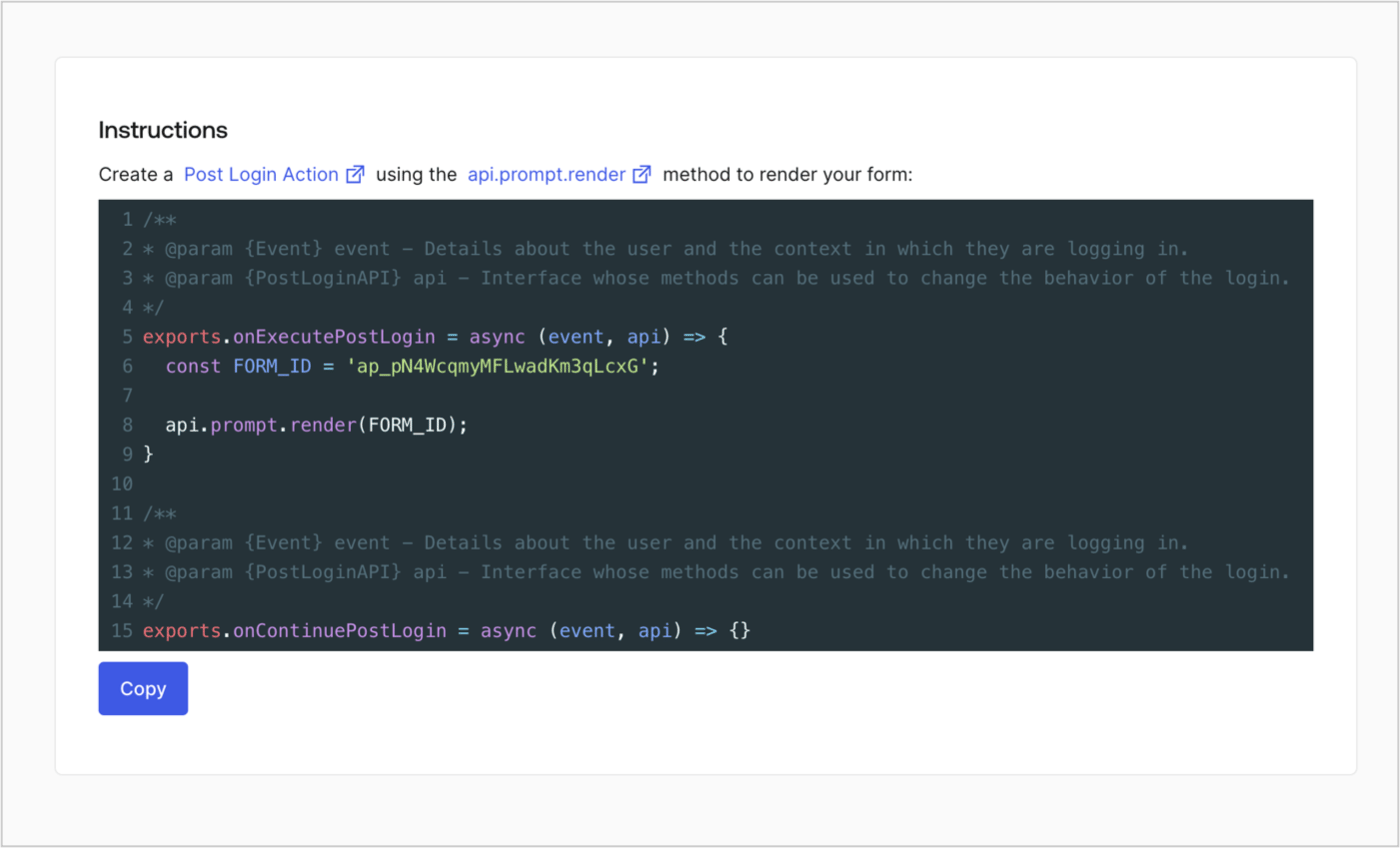
Retrieve your form render code to visually render the form with a custom Post Login Action by following these steps:

* From the Form editor, select **`<> Render`**.
* Select **Copy**.
<Frame>
  <img src="https://mintcdn.com/docs-dev-chore-events-autoupdate/MOUmiRXu5I_3fPz2/docs/images/cdy7uua7fh8z/2EIUzc539sq9lwoTKbjoJv/496a864c0fc44a782c9cadca119dbfb0/embed.png?fit=max&auto=format&n=MOUmiRXu5I_3fPz2&q=85&s=7082c216911bba97387c766dfa39984d" alt="Dashboard > Actions > Forms > Form > Embed" data-og-width="1400" width="1400" data-og-height="848" height="848" data-path="docs/images/cdy7uua7fh8z/2EIUzc539sq9lwoTKbjoJv/496a864c0fc44a782c9cadca119dbfb0/embed.png" data-optimize="true" data-opv="3" srcset="https://mintcdn.com/docs-dev-chore-events-autoupdate/MOUmiRXu5I_3fPz2/docs/images/cdy7uua7fh8z/2EIUzc539sq9lwoTKbjoJv/496a864c0fc44a782c9cadca119dbfb0/embed.png?w=280&fit=max&auto=format&n=MOUmiRXu5I_3fPz2&q=85&s=e241f8c0ff5c2f4e2ce710bf0fb8ab2a 280w, https://mintcdn.com/docs-dev-chore-events-autoupdate/MOUmiRXu5I_3fPz2/docs/images/cdy7uua7fh8z/2EIUzc539sq9lwoTKbjoJv/496a864c0fc44a782c9cadca119dbfb0/embed.png?w=560&fit=max&auto=format&n=MOUmiRXu5I_3fPz2&q=85&s=e00a706e32c07b59485a8650fcc69c3b 560w, https://mintcdn.com/docs-dev-chore-events-autoupdate/MOUmiRXu5I_3fPz2/docs/images/cdy7uua7fh8z/2EIUzc539sq9lwoTKbjoJv/496a864c0fc44a782c9cadca119dbfb0/embed.png?w=840&fit=max&auto=format&n=MOUmiRXu5I_3fPz2&q=85&s=b3f2b101429be35fb987a4e40f23a2fc 840w, https://mintcdn.com/docs-dev-chore-events-autoupdate/MOUmiRXu5I_3fPz2/docs/images/cdy7uua7fh8z/2EIUzc539sq9lwoTKbjoJv/496a864c0fc44a782c9cadca119dbfb0/embed.png?w=1100&fit=max&auto=format&n=MOUmiRXu5I_3fPz2&q=85&s=50c0682479503c1f8d496764975ddf5e 1100w, https://mintcdn.com/docs-dev-chore-events-autoupdate/MOUmiRXu5I_3fPz2/docs/images/cdy7uua7fh8z/2EIUzc539sq9lwoTKbjoJv/496a864c0fc44a782c9cadca119dbfb0/embed.png?w=1650&fit=max&auto=format&n=MOUmiRXu5I_3fPz2&q=85&s=c895cb40bf7e41e983c73118d6d76350 1650w, https://mintcdn.com/docs-dev-chore-events-autoupdate/MOUmiRXu5I_3fPz2/docs/images/cdy7uua7fh8z/2EIUzc539sq9lwoTKbjoJv/496a864c0fc44a782c9cadca119dbfb0/embed.png?w=2500&fit=max&auto=format&n=MOUmiRXu5I_3fPz2&q=85&s=f93e3cb915eae1cc79a84bd74d622803 2500w" />
</Frame>

## Create a Post Login Action

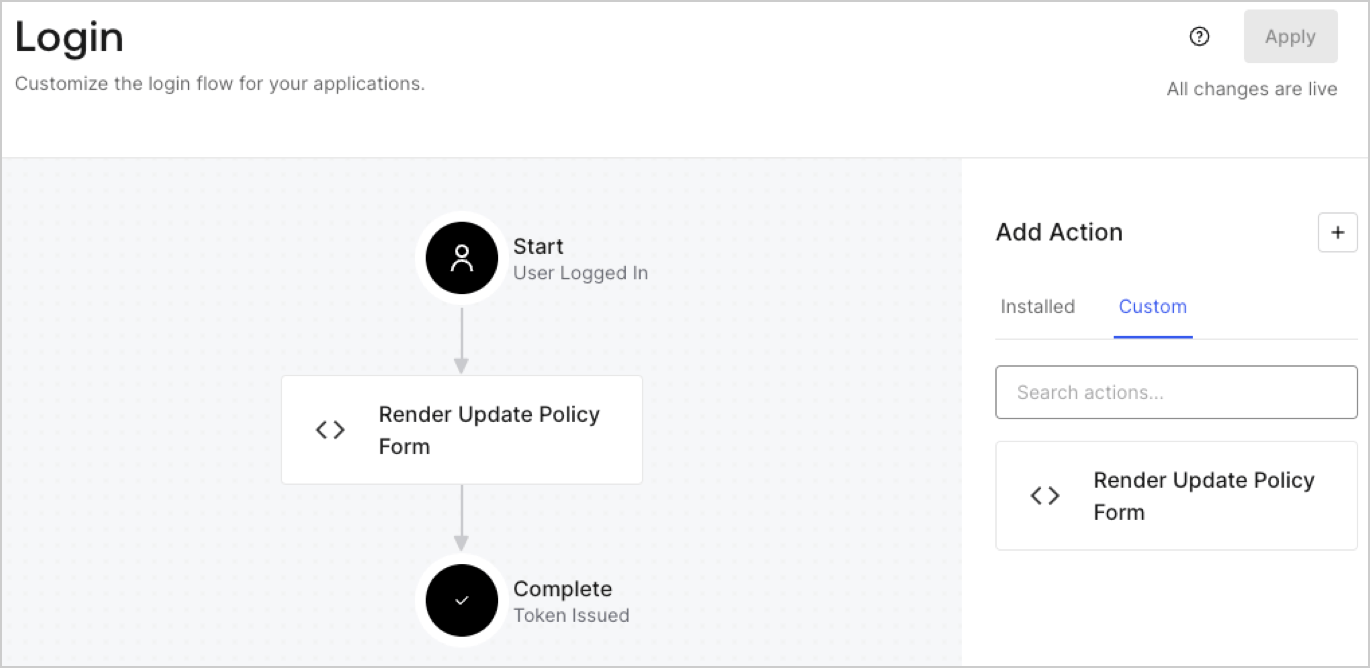
Create a post-login Action to render your form by following these steps:

1. Navigate to **Auth0 Dashboard > Actions > Flows > Login.**
2. Select the **+** icon and Select **Build from scratch**:

   * **Name**: Enter `Render Update Policy Form`.
   * **Trigger**: Select `Login / Post Login`.
   * **Runtime**: Select the recommended version.
3. Select **Create**.

To configure the post-login Action:

1. Delete the existing code from the Code editor.
2. Paste the form render code into the Code editor.
3. Edit the code to define the conditional logic that will render the form.

   ```javascript lines theme={null}
   /**
   * @param {Event} event - Details about the user and the context in which they are logging in.
   * @param {PostLoginAPI} api - Interface whose methods can be used to change the behavior of the login.
   */
   exports.onExecutePostLogin = async (event, api) => {
     const FORM_ID = 'REPLACE_WITH_YOUR_FORM_ID';

     if (event.user.app_metadata.privacy_policies !== true) {
       api.prompt.render(FORM_ID);
     }
   }

   exports.onContinuePostLogin = async (event, api) => { }
   ```

   <Callout icon="file-lines" color="#0EA5E9" iconType="regular">
     The example code above will render the form when a user is missing the app metadata `privacy_policies` property.
   </Callout>
4. Select **Deploy.**
5. Drag and Drop the **Render Update Policy Form** Action to the **Login** flow.
   <Frame>
     <img src="https://mintcdn.com/docs-dev-chore-events-autoupdate/bbEbROOHwGAWmGEh/docs/images/cdy7uua7fh8z/5TOwDgevZsBqd7yZynUYWU/41ca909dc3007aed4f40ff794a05efa5/postlogin.png?fit=max&auto=format&n=bbEbROOHwGAWmGEh&q=85&s=f36186ba9174f6d54f7f21b26c3b1590" alt="Dashboard > Forms > Use Case > Render update policy form login action" data-og-width="1370" width="1370" data-og-height="668" height="668" data-path="docs/images/cdy7uua7fh8z/5TOwDgevZsBqd7yZynUYWU/41ca909dc3007aed4f40ff794a05efa5/postlogin.png" data-optimize="true" data-opv="3" srcset="https://mintcdn.com/docs-dev-chore-events-autoupdate/bbEbROOHwGAWmGEh/docs/images/cdy7uua7fh8z/5TOwDgevZsBqd7yZynUYWU/41ca909dc3007aed4f40ff794a05efa5/postlogin.png?w=280&fit=max&auto=format&n=bbEbROOHwGAWmGEh&q=85&s=49b7f6dfa1506bde84f7d126a516e518 280w, https://mintcdn.com/docs-dev-chore-events-autoupdate/bbEbROOHwGAWmGEh/docs/images/cdy7uua7fh8z/5TOwDgevZsBqd7yZynUYWU/41ca909dc3007aed4f40ff794a05efa5/postlogin.png?w=560&fit=max&auto=format&n=bbEbROOHwGAWmGEh&q=85&s=545af1dd87c12d0a0b707f355147b8bc 560w, https://mintcdn.com/docs-dev-chore-events-autoupdate/bbEbROOHwGAWmGEh/docs/images/cdy7uua7fh8z/5TOwDgevZsBqd7yZynUYWU/41ca909dc3007aed4f40ff794a05efa5/postlogin.png?w=840&fit=max&auto=format&n=bbEbROOHwGAWmGEh&q=85&s=2252080b06f83752b89d9e79baeb0b24 840w, https://mintcdn.com/docs-dev-chore-events-autoupdate/bbEbROOHwGAWmGEh/docs/images/cdy7uua7fh8z/5TOwDgevZsBqd7yZynUYWU/41ca909dc3007aed4f40ff794a05efa5/postlogin.png?w=1100&fit=max&auto=format&n=bbEbROOHwGAWmGEh&q=85&s=d830ce908d08239c681ddaaead8d3e23 1100w, https://mintcdn.com/docs-dev-chore-events-autoupdate/bbEbROOHwGAWmGEh/docs/images/cdy7uua7fh8z/5TOwDgevZsBqd7yZynUYWU/41ca909dc3007aed4f40ff794a05efa5/postlogin.png?w=1650&fit=max&auto=format&n=bbEbROOHwGAWmGEh&q=85&s=c7a04991bbf815a52abbba88df4d2d57 1650w, https://mintcdn.com/docs-dev-chore-events-autoupdate/bbEbROOHwGAWmGEh/docs/images/cdy7uua7fh8z/5TOwDgevZsBqd7yZynUYWU/41ca909dc3007aed4f40ff794a05efa5/postlogin.png?w=2500&fit=max&auto=format&n=bbEbROOHwGAWmGEh&q=85&s=3151fd23b7a86f29f3caed0d6abf0c78 2500w" />
   </Frame>
6. Select **Apply.**

### Test implementation

Test the implementation by following these steps:

1. Log in with an existing user whose app`_metadata` attribute `privacy_policies` does not have a value.
2. The post-login Action in the Login flow will render the form and prompt for acceptance.
3. Select **Auth0 Dashboard > User Management > Users,** locate the user and verify that the `app_metadata` attribute `privacy_policies` contains a `true` value and a timestamp.
